
Direct an agent on your real product
Last week Lovable shipped Pennywise. Today you point Claude Code at the repo, approve diffs, and use Cowork for PRD, research, and launch copy.

Aki Wijesundara, PhD
Instructor · Live session · 90 min
Today you will:
Claude Code reads Pennywise and explains it in plain English. No changes.
Plan, build one step, read the diff, stop. You approve before anything else.
The skill is not writing code. It is reading and approving changes.
Describe the product in Lovable. Get a running preview. Iterate in chat.
Point Claude Code at a real repo. Plan, diff, approve. Ship the next feature.
Repo · features · fixes · refactors
PRD · research · notes · launch copy
You direct and approve. The tools do not replace judgement.
What the agent can see
What it proposes to do
The change it makes
What you approve or reject
Then it returns to context with what it learned.
Good direction beats clever prompting.
Rule for today: nothing merges without your eyes on the diff.
Owns the codebase. Features, fixes, refactors.
Owns the product brain. Docs, research, positioning.
Two windows, one build.
Beyond what Lovable shipped last week — directed, step by step.
Explain the codebase. Change nothing.
You are helping me understand my own project before we change anything. Read the full Pennywise codebase and tell me, in plain English for a non-engineer: 1) what the app does end to end, 2) the main files and what each one is responsible for, 3) where and how expense data is stored, 4) anything that looks unfinished, fragile, or likely to cause problems later. Do not change any code. End with a short list of what you would need from me before adding a new feature.
CSV · categorise · summary — plan before code.
I want to add three things to Pennywise: 1) import bank transactions from a CSV file the user uploads, 2) automatically categorise each transaction, 3) a monthly summary view showing total spend per category. Before writing any code, give me a step-by-step build plan. For each step tell me what you will change, which files it touches, and what I will be able to see or test when that step is done. Flag any decisions you need me to make. Keep the steps small enough that I can review each one. Do not write code until I reply 'go'.
Only step 1. Show the diff. Stop.
Go. Build only step 1 from the plan. When you are done: 1) show me exactly what changed as a diff, 2) explain in one or two plain sentences what this step does, 3) tell me how to test it right now, 4) stop and wait for me before starting step 2. If you hit anything ambiguous, ask me instead of guessing.
Green is what arrived. Red is what left. Approve the intent, not the vibes.
Symptom first. Smallest fix. Wait for go.
Something is broken. Symptom: when I upload my CSV, the monthly summary shows nothing and I get an error on screen. Here is exactly what I see: [paste the error message and describe what you clicked]. Do not start rewriting yet. First find the most likely cause and explain it to me in plain English. Then propose the smallest fix that solves it. Once I say go, make only that fix, show me the diff, and tell me what the actual problem was so I learn from it.
Claude Code
PRD
Field scan
Launch post
Hand the feature to Cowork once the code path works.
Act as a product lead helping me document a feature I just shipped. The feature: Pennywise now lets a user upload a bank CSV, auto-categorises the transactions, and shows a monthly summary by category. Write a one-page PRD with these sections: Problem, User, What it does, Out of scope, Success (with one or two concrete signals). Keep it under one page, plain language, no jargon. Ask me any question you need before writing.
Research the expense-tracking space for me. Find three real tools that let users import transactions from a bank or CSV. For each one give me: the name, one line on who it is for, one thing it does better than my Pennywise feature, and one thing it does worse or is missing. Use current information. Then in two sentences tell me where a simple, private, self-built tracker like Pennywise actually has an edge.
Write a short LinkedIn post announcing that I just built CSV import and a monthly summary into my own expense app, Pennywise, during a bootcamp using Claude Code. Voice: direct, warm, first person, no hype, no em dashes. Structure: a one-line hook, two or three lines on what I built and why it was satisfying, one line on what I learned about directing an AI agent, and a soft invitation to follow along. Keep it under 120 words and give me two versions.
Read the full codebase. Plain English. Change nothing.
Step-by-step plan with files and how to test. No code until go.
Symptom first. Explain cause. Smallest fix. Wait for go.
One-page PRD: Problem, User, What it does, Out of scope, Success.
| Best for | You give it | You get back | |
|---|---|---|---|
| Lovable | New UI / first ship | A product brief | Running preview |
| Claude Code | Existing repo | Plan + approval | Diffs you can merge |
| Cowork | Product work | Context + ask | PRD, research, copy |
A stack, not rivals.
After today: CLAUDE.md, Skills, Subagents, and MCP — how serious builders keep agents reliable.
Open full going-deeper guide →CLAUDE.md — project rules the agent always sees
Reusable playbooks you invoke or that auto-trigger
Workers off to the side for focused jobs
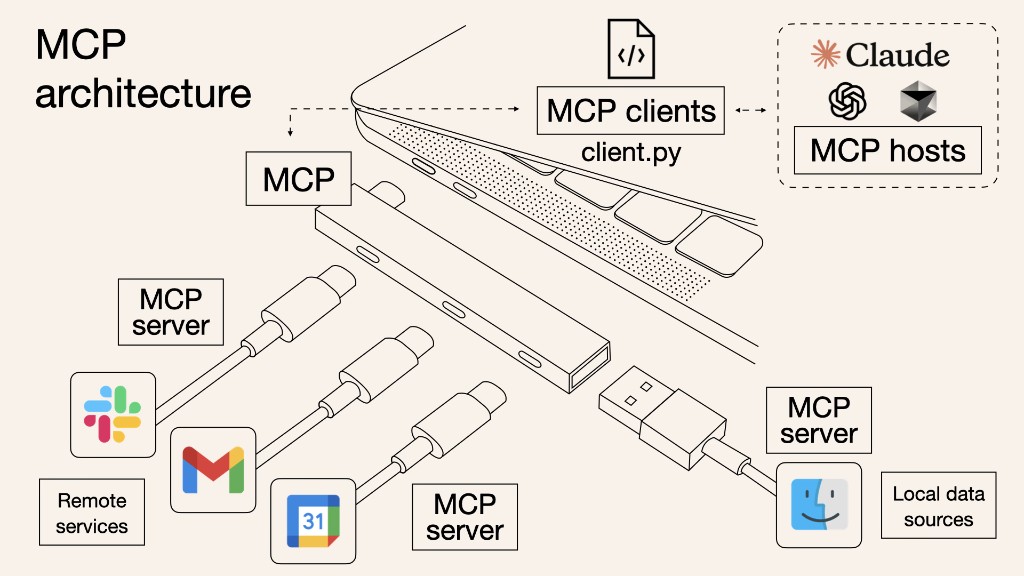
Connect GitHub, Supabase, Notion, and your APIs
/init, then edit until it sounds like your teamOne file. Every session inherits it.
# Pennywise

Expense tracker for one person. Keep it simple.

## Stack
- Next.js + TypeScript
- Local JSON for storage (no DB yet)

## Rules
- Prefer small diffs over rewrites
- Do not touch /archive or .env
- After each step: show the diff,
  how to test, then wait for "go"

## Done means
- Feature works in the browser
- No console errors on happy path
- One sentence explaining the change
Package a playbook (e.g. /new-feature) so you are not retyping the plan prompt every week. Auto skills trigger from context; slash skills you invoke on purpose.
---
name: new-feature
description: Plan then build one feature in small reviewable steps
---
# /new-feature

1. Ask what to build in one sentence
2. Write a short plan: files, steps, how to test
3. Wait for the user to say "go"
4. Build only step 1 — show the diff — stop
5. Repeat for the next step when they say go
One standard plug so Claude Code can talk to many tools — without a custom integration for each.
For Pennywise: GitHub, Supabase, Notion — keys stay outside the chat.
Treat MCP like production access. Least privilege.
| When | Reach for |
|---|---|
| New greenfield UI | Lovable |
| Change an existing repo | Claude Code |
| PRD / research / launch copy | Cowork |
| Same playbook every week | Skill (+ CLAUDE.md) |
| Live systems outside the repo | MCP (carefully) |
Everything from today lives in two places you can reopen later.
Week 2 prompts sheet →Full homework brief →Claude Code from plan to working. Document in Cowork. Create a /new-feature skill. Publish on LinkedIn. Graded on process, not polish.
CSV polish · budgets · receipts · export · sharing
Plan → diffs → working feature → PRD → LinkedIn · skill saved
Screenshot · three lines · short walkthrough
Show the feature, say what you directed, invite one piece of feedback.
Automations and agents that run when you are not in the room.
Recording and slides will be posted. See you in Week 3.
Aki Wijesundara, PhD
Agentic AI Builder's Bootcamp