
TAI Labs

RAG + Vector
Databases

Build smarter /ask with LangChain · Week 2

AI Engineering · Week 2

Dr Aki Wijesundara

Week02

Build smarter /ask
with LangChain.

01
TAI Labs

Today's Agenda

01

Why RAG Exists

The problem with LLMs and how RAG solves it

02

Embeddings Deep Dive

How text becomes vectors and why it matters

03

Vector Databases

Storing and searching semantic data at scale

04

Chunking & Retrieval

The make-or-break step most people get wrong

05

Live Build

Build a working Document Q&A system

02
TAI Labs

What We're Building Today

By the end of this session, you will:

Understand RAG

How RAG works end-to-end

Master Embeddings

How vectors power semantic search

Build a Q&A System

Working document Q&A with LangChain

Format: Theory → Architecture → Live Build → Evaluation

03
TAI Labs

Why RAG Exists

LLMs are powerful but have critical limitations

Knowledge Cutoff

They don't know what happened after training

Hallucinations

They confidently make things up

No Access to YOUR Data

Can't read your docs, PDFs, Slack, databases

The question: How do we ground LLM responses in real, up-to-date, trusted information?

04
TAI Labs

What is RAG?

Retrieval-Augmented Generation

1. Retrieve

Get relevant info from your data

2. Augment

Add context to the prompt

3. Generate

LLM produces grounded answer

Think of it like an open-book exam — the LLM doesn't need to memorize everything, it just needs to look up the right pages.

05
TAI Labs

RAG vs Fine-Tuning vs Prompt Engineering

Choose the right approach for your use case

ApproachWhen to UseCostFreshness
Prompt EngineeringSmall context, simple tasksLowManual updates
RAGLarge/changing knowledge basesMediumReal-time
Fine-TuningChanging model behavior/toneHighRequires retraining

Key insight: RAG handles knowledge, fine-tuning handles behavior — they're not either/or.

06
TAI Labs

RAG Pipeline — Indexing

The offline step: prepare your knowledge base for search
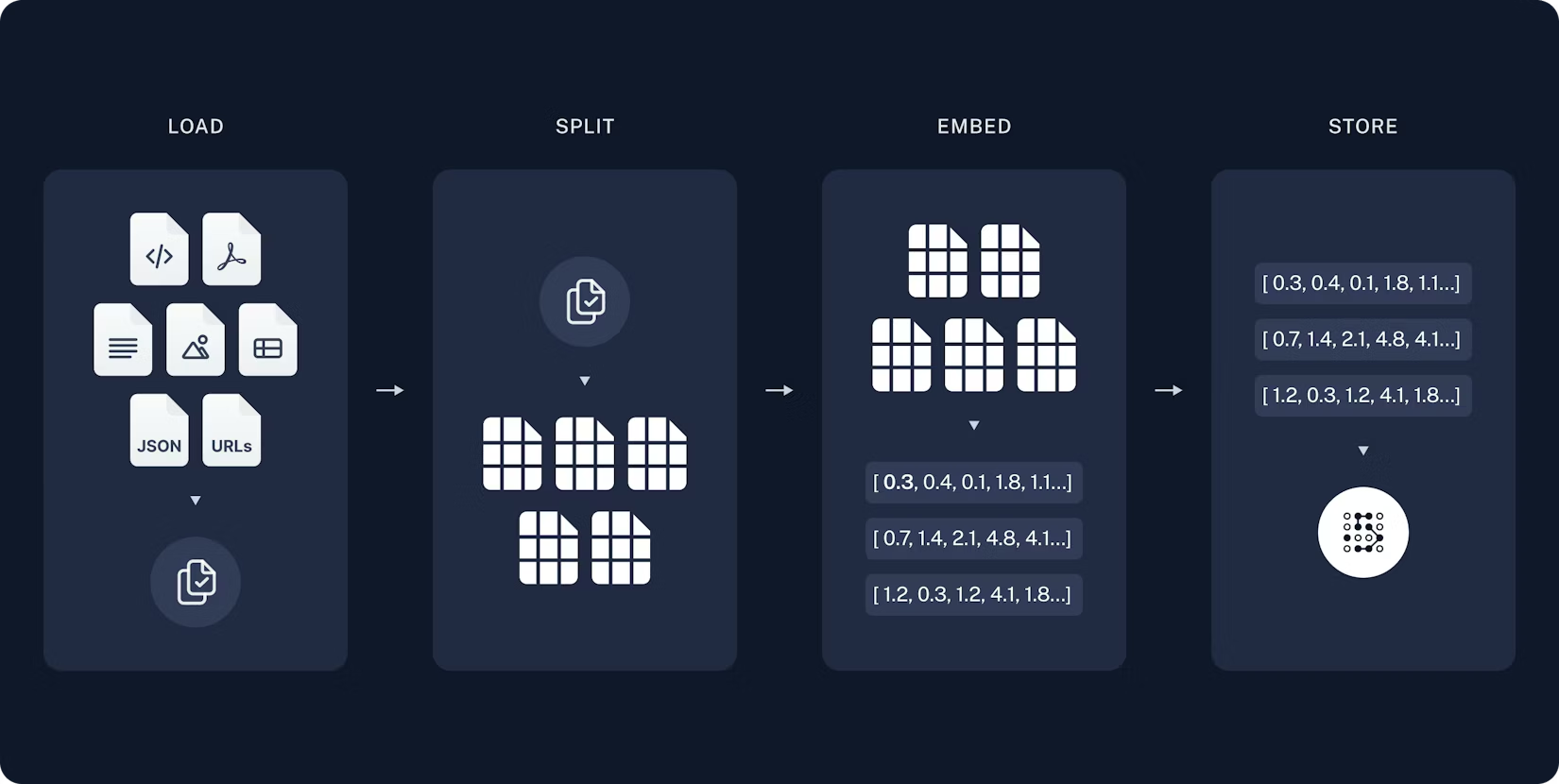
RAG Indexing Pipeline

Indexing Steps

1. Load documents (PDF, web, etc.)

2. Split into chunks

3. Embed each chunk

4. Store in Vector DB


One-time setup — run once per document update

Source: LangChain Documentation

07
TAI Labs

RAG Pipeline — Retrieval & Generation

The runtime step: answer questions using your knowledge
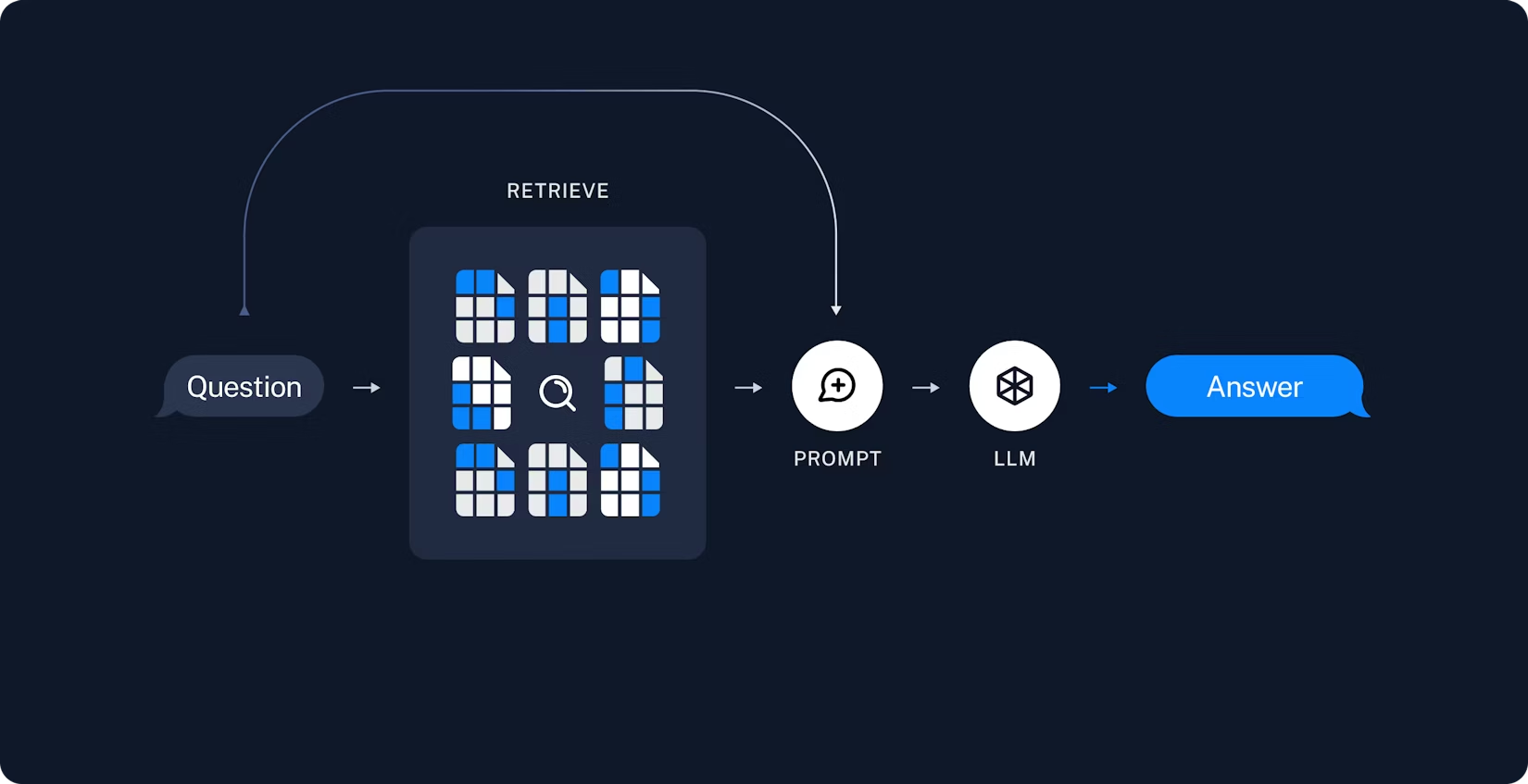
RAG Retrieval and Generation Pipeline

Query Steps

1. User asks question

2. Embed the query

3. Search vector DB

4. Retrieve top K chunks

5. Augment prompt

6. LLM generates answer


Every query — runs in real-time

Source: LangChain Documentation

08
TAI Labs

RAG Architecture — Complete Pipeline

Combining indexing and retrieval into a unified system
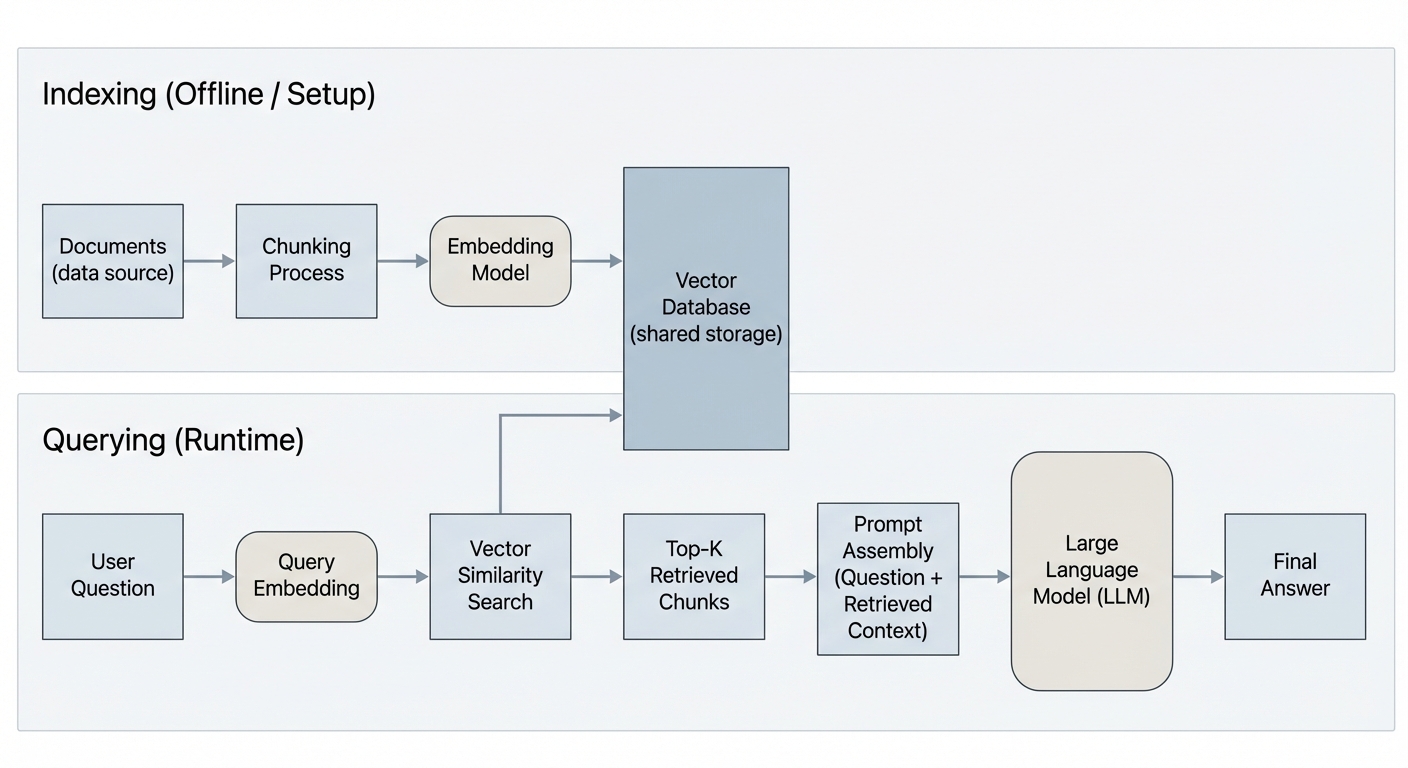
Complete RAG Architecture

Indexing (Offline)

Load → Chunk → Embed → Store in Vector DB

Retrieval (Runtime)

Query → Embed → Search → Retrieve Top K

Generation

Augment Prompt → LLM → Grounded Answer

Key insight: Same embedding model for both indexing and querying!

09
TAI Labs

Let's Talk About Embeddings

A numerical representation of text that captures semantic meaning

# Similar meanings → Similar vectors
"The cat sat on the mat"     → [0.12, -0.34, 0.56, ...]
"A kitten rested on the rug" → [0.11, -0.33, 0.55, ...] ← Very similar!

# Different meanings → Different vectors
"Stock prices fell sharply"  → [0.87, 0.22, -0.91, ...] ← Very different

Why it matters: Similar meanings → similar vectors → we can search by meaning, not just keywords.

10
TAI Labs

Embeddings — Visual Intuition

Imagine a space where every sentence has a position

Semantic search: Your query gets placed in this space and we find the nearest neighbors.

11
TAI Labs

Popular Embedding Models

Choose based on your use case

ModelDimensionsProviderBest For
text-embedding-3-small1536OpenAICost-effective, general purpose
text-embedding-3-large3072OpenAIHigher accuracy tasks
voyage-31024Voyage AICode & technical docs
all-MiniLM-L6-v2384HuggingFaceLocal/free, lightweight

Tradeoff: More dimensions = more nuance but higher storage & latency.

12
TAI Labs

Chunking — The Hidden Make-or-Break Step

Before embedding, you need to split documents into chunks
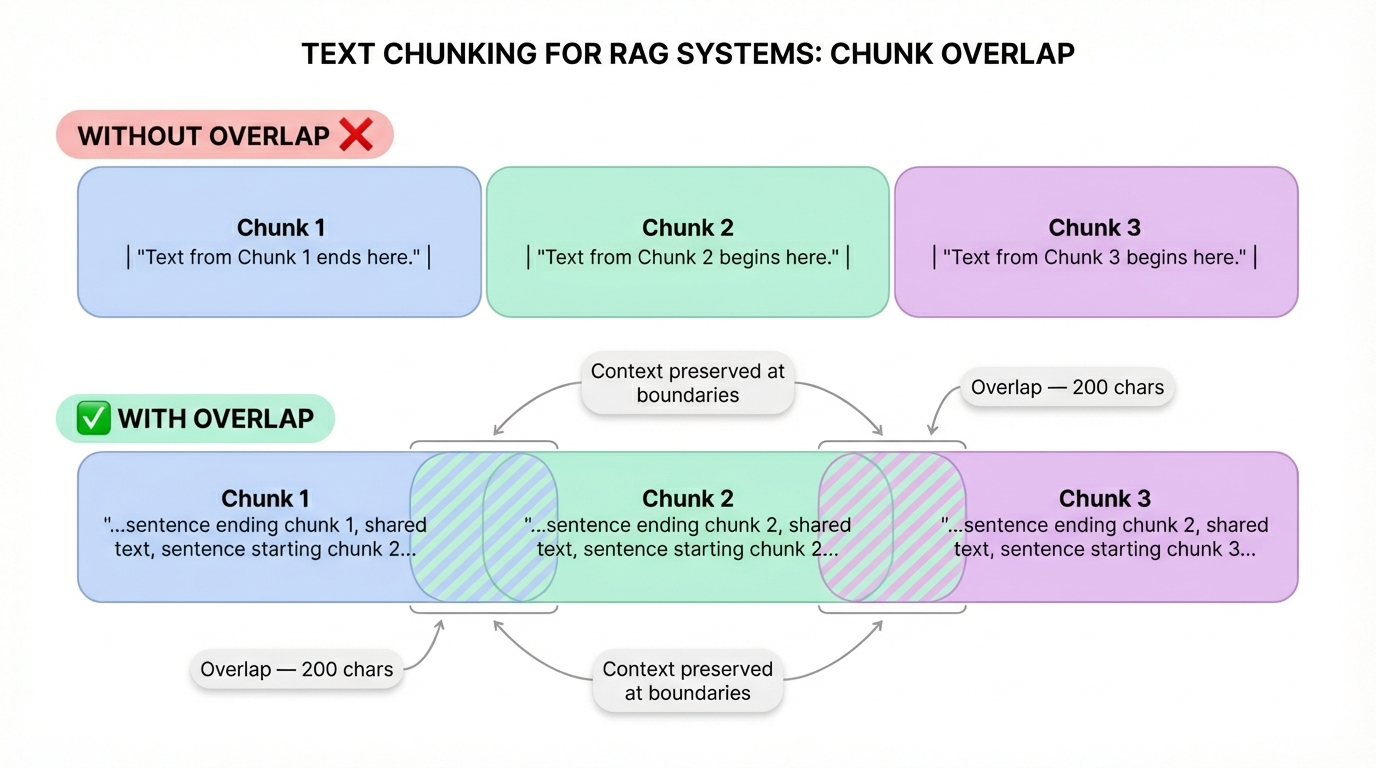
Chunking Explained

Token Limits

Models have limits (512–8192 tokens)

Precision

Smaller chunks = precise retrieval

Balance

Too large = diluted; too small = lost context

13
TAI Labs

Chunking Strategies

Different approaches for different use cases

StrategyHow It WorksBest For
Fixed-sizeSplit every N characters/tokensSimple, predictable
RecursiveSplit by paragraphs → sentences → wordsGeneral-purpose (LangChain default)
SemanticSplit when meaning shiftsHigh-quality but slower
Document-awareSplit by headers, sections, pagesStructured docs (markdown, HTML)

Pro tip: Always use overlap (e.g., 200 chars) between chunks so you don't lose context at boundaries.

14
TAI Labs

What is a Vector Database?

Specialized storage optimized for high-dimensional vectors

Traditional DB

Exact match only

SELECT * FROM docs
WHERE title = 'RAG'

Vector DB

Semantic match

# Find 5 most similar
db.similarity_search(
  query_vector, k=5
)

Uses algorithms like HNSW or IVF to search millions of vectors in milliseconds.

15
TAI Labs

Vector DB Landscape

Pick the right tool for your needs

ChromaDB

Open source, embedded. Great for prototyping.

Pinecone

Managed cloud. Serverless, easy to scale.

Weaviate

Hybrid search (vector + keyword).

Qdrant

Filtering + payload support.

pgvector

Postgres extension. Use existing DB.

FAISS

Meta library. Fast local search.

For today's build: We'll use ChromaDB (simple, local, zero config)

16
TAI Labs

Similarity Search — How It Works

Cosine Similarity — The most common metric
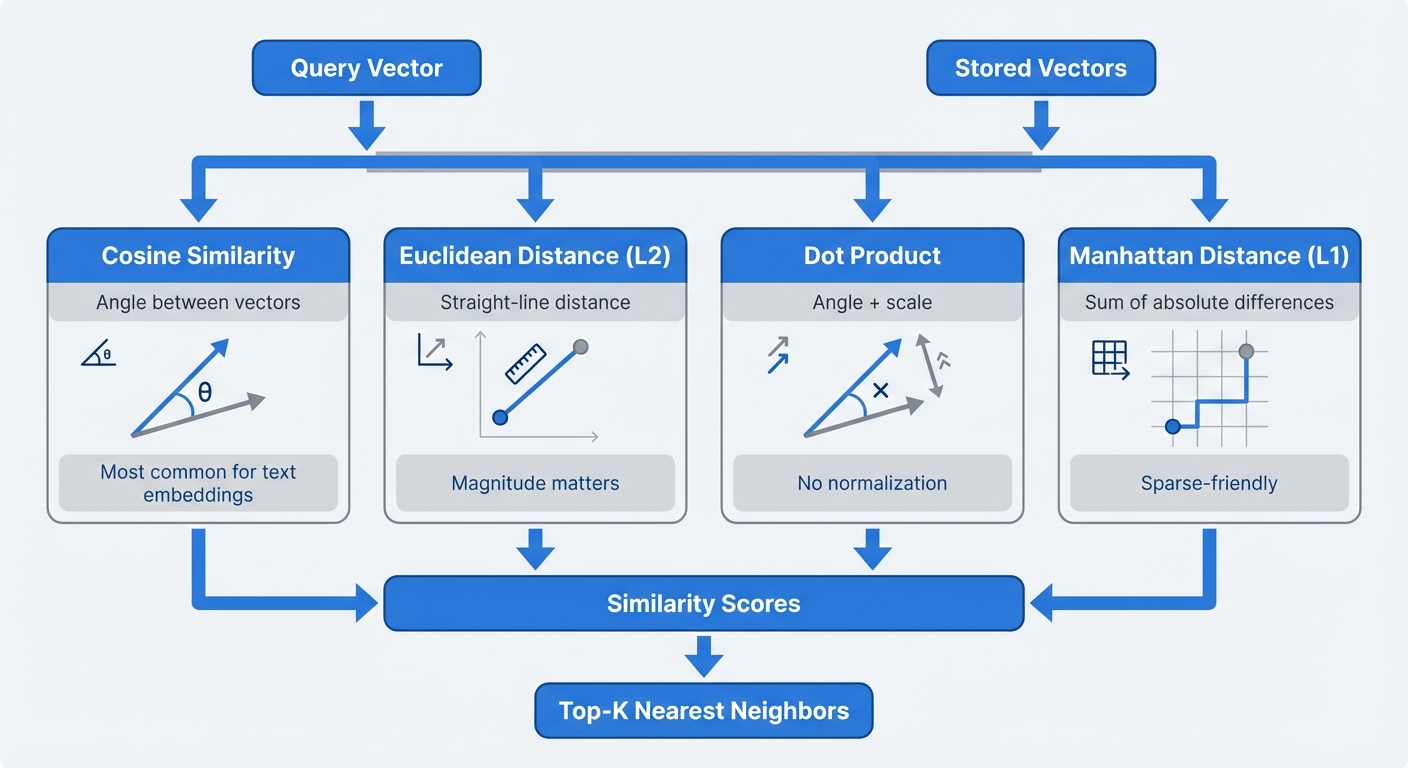
Similarity Search Explained

Measures the angle between vectors

-1.0 Opposite · 0.0 Unrelated · 1.0 Identical

Euclidean (L2)

Straight-line distance between points.

Dot Product

Similar to cosine but scale-sensitive.

17
TAI Labs

Beyond Naive Search

Basic: embed query → cosine search → return top K. Here's how to do better:

Metadata Filtering

Filter by date, source, category before vector search

Hybrid Search

Combine vector similarity with keyword matching (BM25)

Multi-query

Rephrase question multiple ways, search each, merge results

Reranking

Use a cross-encoder to re-score the top results

18
TAI Labs

Prompt Augmentation — The Glue

Format retrieved chunks into the LLM prompt

# The RAG prompt template
prompt = """
You are a helpful assistant. Answer the question based ONLY on
the following context. If the context doesn't contain the answer,
say "I don't have enough information to answer that."

Context:
{retrieved_chunks}

Question: {user_question}
"""

Be Explicit

"Use ONLY this context"

Source Attribution

Ask for citations

Handle Unknown

"I don't know" reduces hallucination

19
TAI Labs

Let's Build — Architecture

What we're building: A Document Q&A system

Index time · offline (run once per doc update)

PDF / Text → Load (LangChain loaders) → Chunk (RecursiveCharacterTextSplitter) → Embed (OpenAI Embeddings) → Store (ChromaDB)

similarity search

Query time · every question

User question → Retrieve (top-k from ChromaDB) → Augment (stuff context in prompt) → Generate (RAG agent → answer)

20
TAI Labs

Setup & Document Loading

Install dependencies and load your documents

# Install dependencies

pip install langchain langchain-openai langchain-community chromadb

# Load documents

from langchain_community.document_loaders import PyPDFLoader

loader = PyPDFLoader("your_document.pdf")
documents = loader.load()

LangChain supports 80+ loaders: PDF, CSV, Notion, Slack, URLs, Google Drive, etc.

21
TAI Labs

Chunking

Split documents into manageable pieces

from langchain_text_splitters import RecursiveCharacterTextSplitter

text_splitter = RecursiveCharacterTextSplitter(
    chunk_size=1000,
    chunk_overlap=200,
    separators=["\n\n", "\n", " ", ""]
)

chunks = text_splitter.split_documents(documents)
print(f"Split into {len(chunks)} chunks")

Why RecursiveCharacterTextSplitter? It tries to split at natural boundaries (paragraphs → sentences → words).

22
TAI Labs

Embed & Store

Convert chunks to vectors and store in ChromaDB

from langchain_openai import OpenAIEmbeddings
from langchain_community.vectorstores import Chroma

embeddings = OpenAIEmbeddings(model="text-embedding-3-small")

vectorstore = Chroma.from_documents(
    documents=chunks,
    embedding=embeddings,
    persist_directory="./chroma_db"
)

1. Chunks → Embedding API

2. Vectors → ChromaDB

3. Persisted to disk

23
TAI Labs

Query & Retrieve

Test your retrieval before wiring up the LLM

# Simple similarity search
results = vectorstore.similarity_search(
    "What are the key findings?",
    k=3
)

for doc in results:
    print(doc.page_content[:200])
    print(doc.metadata)
    print("---")

⚠️ Test this first! If retrieval is bad, generation will be bad — garbage in, garbage out.

24
TAI Labs

The RAG Agent

Connect retrieval to the LLM using modern agent pattern

from langchain_openai import ChatOpenAI
from langchain.agents import create_agent
from langchain.tools import tool

model = ChatOpenAI(model="gpt-4o-mini", temperature=0)

@tool(response_format="content_and_artifact")
def retrieve_context(query: str):
    """Retrieve information from documents."""
    docs = vectorstore.similarity_search(query, k=3)
    serialized = "\n\n".join(
        f"Source: {doc.metadata}\nContent: {doc.page_content}"
        for doc in docs
    )
    return serialized, docs

tools = [retrieve_context]
agent = create_agent(model, tools, system_prompt="Use the tool to answer queries.")

for event in agent.stream(
    {"messages": [{"role": "user", "content": "What is RAG?"}]},
    stream_mode="values"
):
    print(event["messages"][-1].content)

Modern pattern: Agent decides when to retrieve, supports multiple searches per query

25
TAI Labs

Common RAG Failure Modes

Know the symptoms and fixes

ProblemSymptomFix
Bad chunkingHalf-relevant textAdjust chunk size, semantic splitting
Wrong K valueToo much noise or missing contextExperiment with K=3 to K=10
Embedding mismatchIrrelevant resultsTry different embedding model
Prompt leakageLLM ignores contextStrengthen grounding instructions
Boundary issuesAnswer split across chunksIncrease chunk overlap
26
TAI Labs

Evaluating Your RAG System

You can't improve what you can't measure

Retrieval Relevance

Are the right chunks being returned?

Answer Faithfulness

Is the answer grounded in the context?

Answer Correctness

Is the answer factually right?

Quick evaluation approach: Create 10-20 test questions with known answers · Run them through your pipeline · Check: Right chunks retrieved? Correct answer? · Tools: RAGAS, LangSmith, manual review

27
TAI Labs

Level Up — What's Next

Once your basic RAG works, explore:

Hybrid Search

Combine BM25 keyword search with vector search

Reranking

Use a cross-encoder (e.g., Cohere Rerank) to re-score results

Multi-modal RAG

Embed images, tables, charts alongside text

Agentic RAG

Let the LLM decide when and what to retrieve

28
TAI Labs

Key Takeaways

The essential points to remember

01

RAG = Retrieval + Augmentation + Generation — it's an open-book exam for LLMs

02

Embeddings capture meaning — enabling search by concept, not just keywords

03

Chunking is critical — bad chunks = bad retrieval = bad answers

04

Always test retrieval first — before wiring up generation

05

Start simple, iterate — basic RAG with good chunking beats complex RAG with bad data

29
TAI Labs

Homework — RAG on Your Week 1 Endpoint

Extend your Week 1 POST /ask on Render into a RAG API — vector store, POST /ingest for new docs, and retrieval-first /ask — on data you care about.

6 Required Steps

  1. Pick vector store — Pinecone (cloud, easier) or ChromaDB / pgvector (self-hosted)
  2. Build POST /ingest — load docs, chunk with overlap, embed, upsert + metadata
  3. Test retrieval FIRST — right chunks back before wiring the LLM
  4. Upgrade POST /ask — retrieve → ground (cite + refuse) → generate
  5. Deploy both endpoints on Render — prove with live curl
  6. Evaluate — ≥5 golden questions: retrieval + faithfulness + correctness

Stretch Goals (pick 1+)

  • Chunk size comparison
  • Hybrid search
  • Metadata filtering
  • Reranking
  • Streamlit UI
  • Multi-document / batch ingest

Submit: Live Render URL + README (architecture, how to ingest, eval scores, what broke). Maven/WhatsApp for URL — never on LinkedIn.

30
TAI Labs

Questions?

Let's discuss what we've learned today

Resources

  • LangChain Docs: python.langchain.com
  • ChromaDB Docs: docs.trychroma.com
  • Embedding Leaderboard: huggingface.co/spaces/mteb/leaderboard
  • RAGAS (Evaluation): docs.ragas.io

Your challenge: Build a RAG system on YOUR data this week!

31