
Anatomy of
Agentic Memory
 Aki Wijesundara
 Manu Jayawardana
Today's agenda
What we will cover in this session.
Foundations
Why memory is state, not retrieval
Taxonomy
Types, storage, OKF, and patterns
Coding agents
How context gets spent and compacted
Lifecycle
Write, consolidate, then retrieve
Durability
Keeping long-running tasks alive
Failure modes
When memory becomes an attack surface
Close
Capstone prep and what good engineers do
Demos
Live walkthroughs throughout
Agent = Model + Harness
The model is stateless by design. Memory is the layer you add so the agent can persist beyond a single call.
The shift
We are moving from a one-shot model API to an agent that must stay coherent across many turns and sessions.
Every call starts at zero
The model has no built-in past. You rebuild the context from scratch on every request.
Memory bridges the gap
An external memory system holds what the model cannot keep inside its weights or a single window.
Memory vs context
These two ideas fail differently, scale differently, and cost differently. Treat them as separate systems.
- ·It is everything the system could know later.
- ·It is fundamentally a storage problem.
- ·It fails through staleness, drift, and poisoning.
- ·It scales with how carefully you write.
- ·It is only what the model sees on this turn.
- ·It is fundamentally a selection problem.
- ·You pay for it again on every inference call.
- ·It fails through rot and bad packing.
Why RAG is not memory
You may use the same retrieval tools, but the job is different.
The context window is not abstract
Open a live coding-agent session and inspect it with /context.
- The system prompt, tools, and MCP servers
- Files you already read and the conversation so far
- Tool definitions, before any real work begins
- Stale files that no longer matter to the task
- Everything here is context, not memory
- You pay for every token on every later call
- Unused history still burns the budget
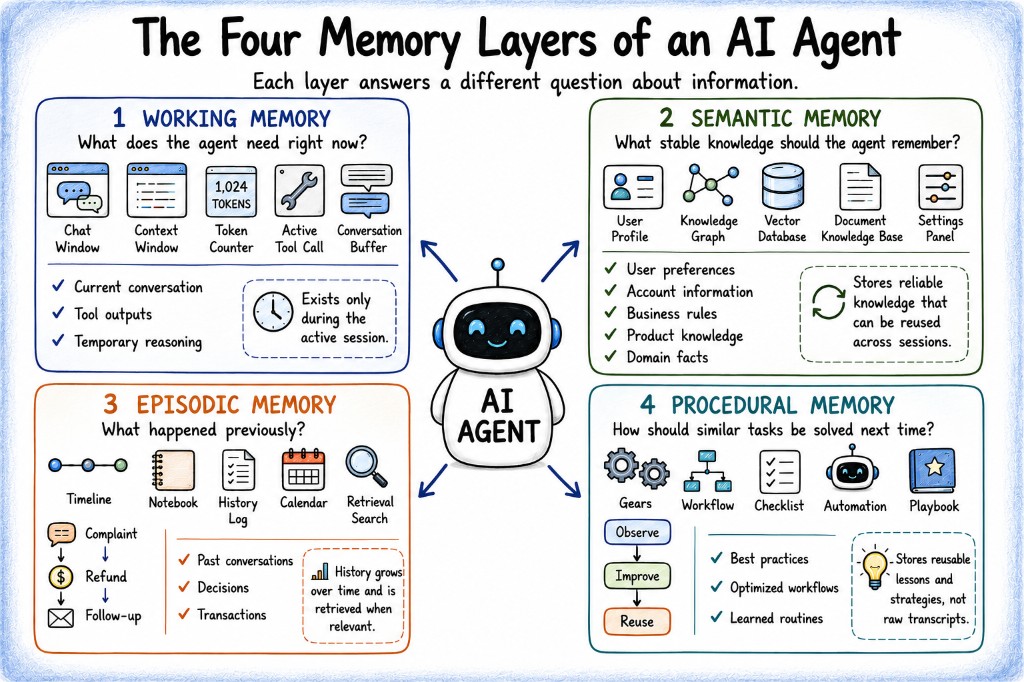
The four memory types
Match the retrieval mechanism to the kind of data you are storing.
The active context window: the prompt, reasoning traces, and KV cache for this turn.
Distilled facts the agent should know later, like “Postgres is the primary datastore.”
Lossless records of what happened and when: logs, decisions, and debug traces.
Reusable skills and workflows: skill libraries, CLAUDE.md, and slash commands.
The four memory layers
Each layer answers a different question. Use this map to evaluate what your agent actually needs.
Storage substrates
Sometimes the answer is not “add a vector database.” Sometimes it is simply “write a file.”
- ·Model weights: parametric, slow to change, and expensive
- ·Latent states that only last for the current run
- ·The KV cache, which speeds inference but does not store knowledge
- ·Vector indexes for geometric similarity search
- ·Text records such as summaries, notes, and markdown
- ·Structural stores such as knowledge graphs and SQL
- ·The filesystem itself as a memory substrate
Knowledge as a living wiki
Organisation knowledge is scattered across catalogs, wikis, comments, and people's heads. Agents should not have to reassemble that from scratch every time.
A shared markdown library that grows
Agents read and update the files. Humans curate when needed, the way they curate code.
You already know cousins
Obsidian vaults, CLAUDE.md and AGENTS.md, notes with cross-links, and metadata-as-code repos.
The bookkeeping that made humans quit personal wikis
Updating cross-references. Touching many files in one pass. Keeping metadata consistent. That is exactly what LLMs are good at.
Andrej Karpathy coined the term LLM wiki: raw sources compiled by an LLM into a living markdown knowledge base, usually viewed in Obsidian.
Open Knowledge Format (OKF v0.1)
A vendor-neutral standard for the wiki pattern: markdown concept files with YAML frontmatter, and no required SDK.
Minimally opinionated
Only type is required. The content model stays yours.
Producer / consumer
Humans or agents can write the files, and any agent or viewer can read them.
Format, not platform
You ship knowledge as files in git. There is no proprietary account to open first.
okf/SPEC.md.The five patterns
Optimise for accuracy per unit of complexity, not for accuracy alone.
Meet gstack and gbrain
Two open-source tools from Garry Tan. Skim now, dig into the repos later if useful.
A Claude Code toolkit with about 23 opinionated role tools (CEO, designer, eng manager, release, docs, QA). It is about how the coding agent works.
An agent brain layer: personal or company knowledge with search, a typed graph, and synthesis. It is about what the agent remembers from notes.
Vector search vs graph traversal
Same idea as gbrain: vector search vs typed graph on one notes corpus. The lab uses a local equivalent.
search
Returns pages that talk about Acme, ranked by similarity.
graph-query
Returns the actual people linked through typed edges written at ingest.
The scale of the problem
No context window solves this on its own: not 1M tokens, and not 10M either.
Compaction
Compaction compresses history into a denser working state so the agent can keep going.
What compaction destroys
Trigger early when you can, and never rely on compaction to preserve critical rules.
- ·The current task
- ·Recent errors
- ·Important file names
- ·Active working state
- ·The initial instructions
- ·Intermediate decisions
- ·Style and writing rules
- ·The reasoning behind earlier choices
The four levers (cheapest first)
For coding agents, context delivery is often a navigation problem, not only a compression problem.
Where rules actually live
If a rule matters, put it above the compaction line so it cannot quietly disappear.
Watch a rule die
We run two identical Claude Code sessions on the same task and the same repo.
You say “Add // REVIEWED to every file you edit.” The agent complies before compaction, then quietly stops afterwards.
You put the same rule above the compaction line. The agent keeps following it after compaction.
Retrieval vs synthesis
Same idea as gbrain search vs think: retrieve pages, or synthesise an answer. Search is cheap. Thinking costs a model call.
search
Returns five ranked pages. It found material, but it did none of the synthesis work.
think
Returns a synthesised answer plus a gap analysis, such as “nothing since 22 April.”
The write path
Building memory often costs more energy than querying it. Measure write cost as carefully as retrieval quality.
LLM extract
Pull atomic facts or triples with a model. Accurate, but expensive.
Deterministic
Dependency parsing can reach about 94% of LLM quality at a fraction of the cost.
Zero-LLM write
gBrain pattern-matches wikilinks into typed edges at ingest, with no model call.
An agent that remembers everything remembers nothing useful.
Rule: if a fact changes often, stays local to one task, or has low confidence, keep it in session state or an artifact, not in permanent memory. This is where quality is won or lost, and it is also where pollution and poisoning enter the system.
Consolidate and retrieve
Useful work also happens in the background: Cursor background agents, Letta sleep-time compute, and the gBrain dream cycle.
- Keep only the most important memories, roughly the top 20%
- Merge duplicates and resolve entity drift
- Let confidence decay as facts age
- Hard-delete when eviction is required, including GDPR cases
- Passive retrieval injects relevant memory before the agent acts
- Active retrieval lets the agent hunt across tiers with tools
- Reasoning-over-structure uses SQL or SPARQL when relations matter
An agent editing its own memory
Watch an agent decide what to persist, then recall it later in a fresh session.
memory_replace or memory_capture fire as it decides what to keep.Checkpoints are not durable execution
Checkpointing saves state. Durable execution guarantees that the work can finish.
“I saved your state. You take it from here.”
- ·It saves between nodes, not inside a running node
- ·If the process dies, the run dies with it
“Your workflow will run to completion.”
- ·It can recover without repeating side effects
- ·Failure detection and recovery become your responsibility
What durable execution requires
Persist completed boundaries, then recover without repeating mutations.
Kill it mid-run
We use LangGraph with a Postgres checkpointer: three nodes, and node 2 loops over 100 items.
Clean run
The workflow completes end to end without interruption.
Kill between nodes
Restart with the same thread_id and it resumes cleanly.
Kill inside node 2
It stopped at item 60, then restarts from item 0.
thread_id, and sixty items of work are lost. If those were emails, you would send sixty duplicates. Idempotency keys close that gap.Memory poisoning (OWASP ASI06)
Security used to mean protecting model weights. Now it also means protecting the operational context an agent carries forward.
Memory laundering
Sanitise before the memory update, not after the damage is already stored.
- ·Toxic context is compressed below the detector threshold
- ·Hostile framing still survives inside the summary
- ·Consolidation launders away the original provenance
- ·Sanitise content before every write
- ·Keep provenance: source, time, trust, and validation
- ·Audit memory with a trusted model
- ·Prefer auditable retrieval, such as inspectable SQL
Poison your own agent
This demo shows how one memory write can persist across sessions.
What separates good engineers
Ten habits. Memory is an architecture problem, not only a model problem.
The five questions
Use these for any memory system, any vendor, and any paper.
Four exercises
Use these to practice applying the framework.
Pick a legal, customer-support, coding, or clinical workload. Choose a pattern and justify it with accuracy per unit of complexity (0 to 4).
Design a merge policy for dietary preferences: contradictions, temporary states, and confidence decay.
You are six hours into a twelve-hour migration and the process dies. What is lost, what re-runs, and what fires twice?
An attacker gets exactly one write. Map the blast radius. How would you detect it, and how would you trace it after the fact?
Capstone: demo day in two weeks
This is the last session. Use the next two weeks to ship something publishable and rehearse a clear demo.
Start with what you are solving. Fun projects are fine. If there is no hard business problem, say what the product does and why it is interesting.
Walk through how the system is put together: agents, memory, tools, APIs, and how the pieces talk to each other.
Name the technology stack and any tools you used. Keep it concrete so the audience can see what is real.
Show the product working. Keep the story aligned with the problem and architecture.
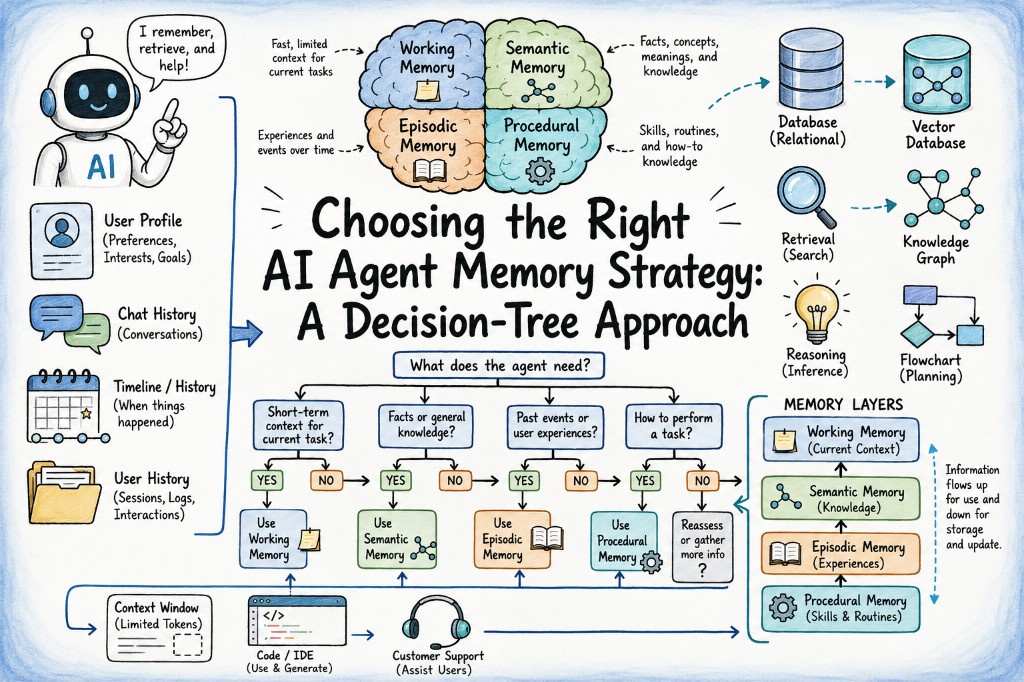
Choosing a memory strategy
A decision-tree view of the same four layers. Useful when you need to pick a strategy under pressure.
Memory is storage. Context is selection.
Put critical rules above the compaction line. Gate every write. Design forgetting on purpose. Treat memory as an attack surface. See you on demo day.