One onboarding problem, eight Claude Code workflows
from customer interviews to a release note, with every skill file to copy
By the TAI Labs team
This write-up follows one product problem through eight Claude Code workflows: from customer interviews, to the numbers, to a PRD, tickets, a release note and the weekly update. Each workflow is a skill file you can download, copy and run again next week.
The product, Tallyboard, is made up, and so are its customers and users. We planted one problem in it on purpose, so you can check whether each workflow finds it. The tools are real: a real Amplitude project, real competitor pricing pages, and a fresh Claude Code session for every step, which had not seen the expected answers.
8
customer interviews, fictional, with a planted theme
In Week 2 we teach five steps for building any AI workflow. Break the task into steps. Decide where the data comes from: local files, a CLI, an MCP server, an API, the browser. Pick the primitive: a skill, an agent, a command or a hook. Shape the output with a template, best practices and examples. Then build it with Claude, a bit at a time.
We added a sixth: check it. Keep a few inputs where you already know the right answer, and run the skill against them every time you change it. On this project it was the most useful step.
Here's the whole project. Everything Claude needs is a file in this folder.
the kit, as a tree
pm-workflow-kit/
  CLAUDE.md                 product context and the rules for every task
  research/interviews/      8 transcripts, each with a six-line header
  evidence/                 data answers, competitor scans, a CSV export
  prd/  tickets/  releases/  updates/  learnings/
  skills/
    synthesize-interviews/
      SKILL.md              the steps, in order
      templates/summary.md  the shape of the output
  hooks/                    saves your corrections between sessions
  evals/                    the answers we expect (kept out of runs)
The file doing the most work is CLAUDE.md. Claude Code reads it at the start of every session. Ours has the product context and five rules. The first one is “never invent a quote”.
CLAUDE.md
# Tallyboard onboarding project

Fictional sample project from the TAI Labs Week 2 PM workflows post. Tallyboard is a
made-up B2B reporting tool: a team connects a data source (Postgres, Google Sheets or a
CSV upload) and builds dashboards on it.

## Product context
- Customers are 10 to 2,000 person companies. Buyers are ops leads, founders, finance
  leads and data analysts. At larger accounts an IT admin approves data access.
- Onboarding: Signed Up, Created Workspace, Connected Data Source, Viewed First Report,
  Invited Teammate. These are also the Amplitude event names.
- Analytics: Amplitude project 866138. Mock data: every user id starts with `demo_`.

## Folders
- `research/interviews/` one transcript per file, each with a six-line header
- `research/summaries/` one summary per interview (written by the synthesis skill)
- `evidence/` data answers, competitor scans, CSV exports
- `prd/` PRD drafts and critiques
- `tickets/` tickets drafted from a PRD
- `releases/` past release notes, this release's changes, new notes
- `updates/` weekly notes and stakeholder updates
- `learnings/` what each session taught us
- `skills/` the workflows. Copy them into `.claude/skills/` to use them.
- `evals/` expected answers. Do not open `evals/` unless you are asked to run an eval.

## Rules for every task
- Never invent a quote. A quote must appear word for word in the file you cite.
- Never invent a number. Every number names its source: a file, or the Amplitude query.
- If you cannot find something, say so. Do not fill the gap with something plausible.
- Leave any section marked "PM fills this in" empty.
- Write the output to a file, not only to the chat, and say which file.
To use the skills, copy them where Claude Code looks, and start it:
terminal
mkdir -p .claude/skills && cp -r skills/* .claude/skills/
claude
Step 01Synthesise the interviews
The first job is reading eight interview transcripts and finding what several people said, as opposed to what one person said once.
The skill does it in two passes. First a summary per interview, from a fixed template, so every summary has the same shape. Then a synthesis across all of them, where every theme carries a count (“7 of 8”) and one quote per interview that supports it.
.claude/skills/synthesize-interviews/SKILL.md
---
name: synthesize-interviews
description: Summarise each customer interview in research/interviews/ with a fixed template, then synthesise across all of them into themes with source counts and verbatim quotes. Use when asked what customers are struggling with, for interview themes, or for a research synthesis. Not for a single document or for market research.
---

# Synthesize interviews

## 1. Take stock
- List every file in `research/interviews/`. Say the total (M).
- Read each header. A file with no header is named and left out, not guessed at.

## 2. One summary per interview
For each file, fill `templates/summary.md` and save it to
`research/summaries/<same file name>`. Quotes are copied, never reworded.

## 3. Synthesise
Write `research/synthesis.md`:
- **Themes**: one sentence each, in the customers' words where possible, then
  `N of M interviews`, then one verbatim quote per supporting file, each followed by
  the file name in brackets, like: "quote" (2026-08-18-ops-lead-agency.md)
- Order themes by N, highest first.
- **Single observations**: anything only one file says. Never promote these to themes.
- **Disagreement**: where segments want the same thing for different reasons, give
  both sides with quotes. Do not pick a winner.
- **By segment**: one line per segment on what they care about most.
- **What this does not tell us**: sample size, who we did not talk to.

## 4. Check your own quotes
Run `python3 evals/check_quotes.py research/synthesis.md` if it exists. Otherwise
search each quote in the file you cited. Remove any quote that is not found
word for word, and say how many you removed.
Local Markdown files
Claude Code skill
Python quote checker
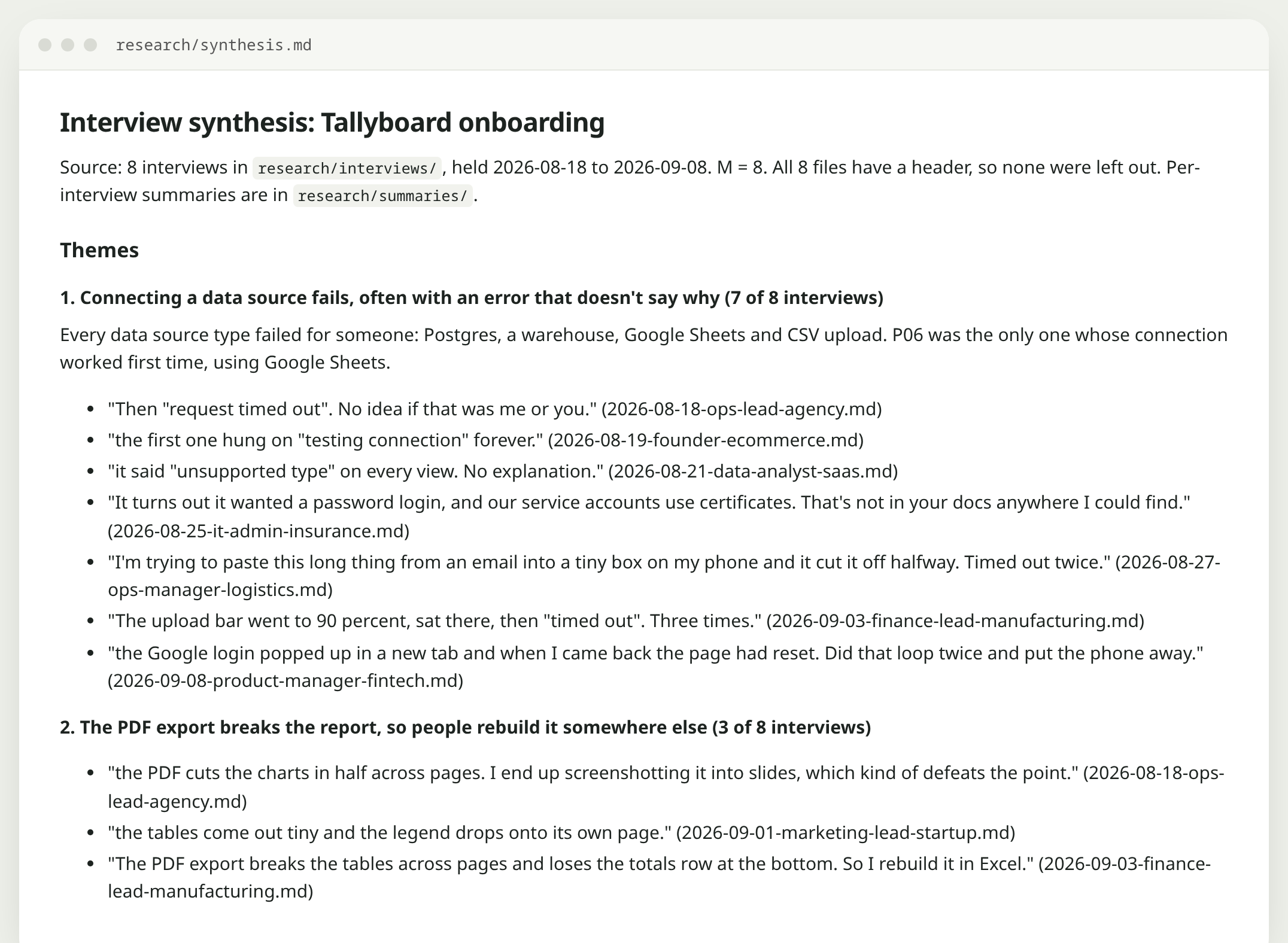
The real output, research/synthesis.md. Every quote is followed by the file it came from.
It found the planted problem first: connecting a data source fails, 7 of 8. It kept the three one-off requests (Slack alerts, Okta, dark mode) out of the themes. It spotted that the founder and the IT admin both wanted to skip the connect step for opposite reasons, and it didn't pick a side.
What came up
Nothing went wrong on this run. The risk to watch for on interview data is a quote that sounds right but isn't in any transcript.
The line in the skill
“Remove any quote that is not found word for word, and say how many you removed.” Then a 34-line script actually checks: 29 quotes, 0 missing.
Step 02Size the problem in Amplitude
Interviews tell you what people said. The next question is how many users it affects, and where.
Amplitude ships an official MCP server, so Claude Code can query your project directly. Setup took us two minutes and one browser sign-in, with no API keys. We sent 400 mock users into a real Amplitude project, with the problem planted in the data, and asked one plain question.
terminal · from Amplitude's docs
claude mcp add -t http -s user Amplitude "https://mcp.amplitude.com/mcp"
# then, inside Claude Code:
/mcp
# sign in to Amplitude, then ask:
What Amplitude projects can I access?
Where do new users drop off in onboarding over the last 30 days, and is it the same on every device?
Desktop (241 sign-ups) Mobile web (159 sign-ups)
Signed up
100% · 241
100% · 159
Created workspace
70% · 169
55% · 87
Connected data source
43% · 104
18% · 29
Viewed first report
28% · 67
14% · 23
Amplitude, project 866138, last 30 days, 7-day conversion window. Mock data: 400 demo users we generated, with the problem planted on purpose.
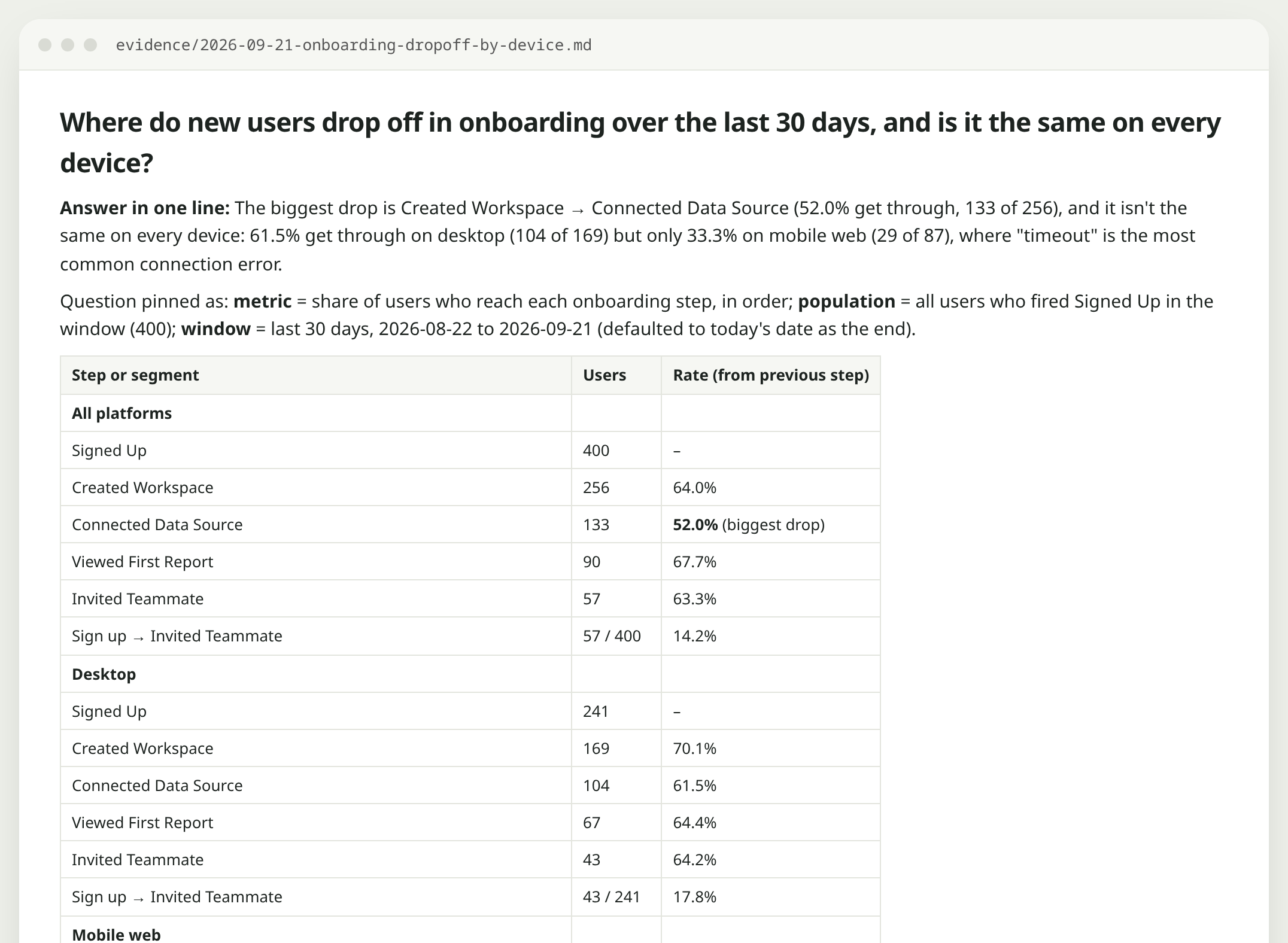
The leak is the connect step. On desktop, 62% of people who make a workspace get their data connected. On mobile web it's 33%. The most common error on mobile is a timeout. That matches what three people told us about trying this on a phone.
.claude/skills/answer-data-question/SKILL.md
---
name: answer-data-question
description: Answer a plain-English product data question with Amplitude (through the Amplitude MCP) or, if that is not connected, the CSV in evidence/. Writes an auditable answer to evidence/. Use for funnel, conversion, drop-off, segment or "how many" questions.
---

# Answer a data question

## 1. Pin the question
Restate it as: metric, population, time window. If one is missing, pick a sensible
default and say which one you picked.

## 2. Find real names first
- Amplitude: call get_amplitude_context, then search the taxonomy for the events and
  properties you need. Use names exactly as returned. Never guess an event name.
- No Amplitude: read the header row of `evidence/onboarding-events.csv` and use
  Python (the standard `csv` module is enough).

## 3. Run it, then cut it once
Run the headline query. Then break it down by at least one dimension that could
change the story (platform, acquisition source, error reason) before you conclude
anything. A headline with no breakdown is not an answer.

## 4. Write the answer
Save `evidence/<yyyy-mm-dd>-<short-slug>.md` using `templates/answer.md`. Every
number in it comes from a query in the "How we got this" section.

## 5. Flag what could be wrong
Small groups (under 30 users), missing labels in the result, and anything that
looks too clean.
Amplitude MCP
CSV export + Python
Claude Code skill
The answer file from the fresh session. It shows its working: source, events, window and breakdown.
What came up
The fresh session couldn't use our Amplitude sign-in, which is stored per session. Without a fallback it would have stopped. It also noticed our data was “too clean”: nobody who hit an error ever connected later. Real data would be messier, and it said so.
The line in the skill
“No Amplitude: read the header row of the CSV.” Same answer, from a file. And “A headline with no breakdown is not an answer”, which is why it found the mobile gap at all.
Step 03Scan competitors
Before writing the spec, we wanted to see how similar products handle this. We gave the skill three real pricing pages (Databox, Geckoboard and Metabase) in a text file and asked for one table.
.claude/skills/competitor-scan/SKILL.md
---
name: competitor-scan
description: Read each URL in evidence/competitors.txt and build a comparison of how competitors handle onboarding and pricing, with the date checked and a verified column for the PM. Use for competitor pricing or feature comparisons.
---

# Competitor scan

1. Read `evidence/competitors.txt`: one URL per line, `#` lines are notes.
2. Open each URL. If a page will not load or needs a login, write "could not read"
   for that row. Never fill a row from memory: prices change and your memory is old.
3. For each competitor record: plans and prices exactly as shown on the page, whether
   there is a free plan or trial, what it says about connecting data or sample data,
   and whether view-only users cost less.
4. Write `evidence/competitor-scan-<yyyy-mm-dd>.md` with one table:
   `Competitor | Plan | Price as shown | Free option | Viewer pricing | Onboarding notes | Source URL | Checked on | Verified by PM`
   Leave "Verified by PM" empty.
5. Under the table, three bullets: what we could copy, what we should avoid, and what
   the pages did not tell us.
competitors.txt
Web fetch
Claude Code skill
It read all three pages twice. Where the two reads disagreed on a price, it left the price out and told us why, instead of picking one. Its most useful line wasn't about price at all: none of the three pages mentions sample data for someone who hasn't connected yet.
What came up
Its two reads of the same pages disagreed on some prices. A model can also repeat an old price from memory without saying so.
The line in the skill
“Never fill a row from memory.” Plus an empty Verified by PM column. We haven't filled it in, so we aren't quoting their prices here.
Step 04Write and review the PRD
We gave the skill a rough brain dump, the kind of notes you type between meetings:
people bail at the connect step. make connect optional ('connect later'), explore with sample data first, better error msgs for timeouts (tell them about IP allowlist), mobile: offer 'email me a link to finish on desktop'…
It wrote the PRD from our template, with every claim citing a file and the success metrics left blank for us. Then, as a second step, it reviewed its own draft as a sceptical head of product.
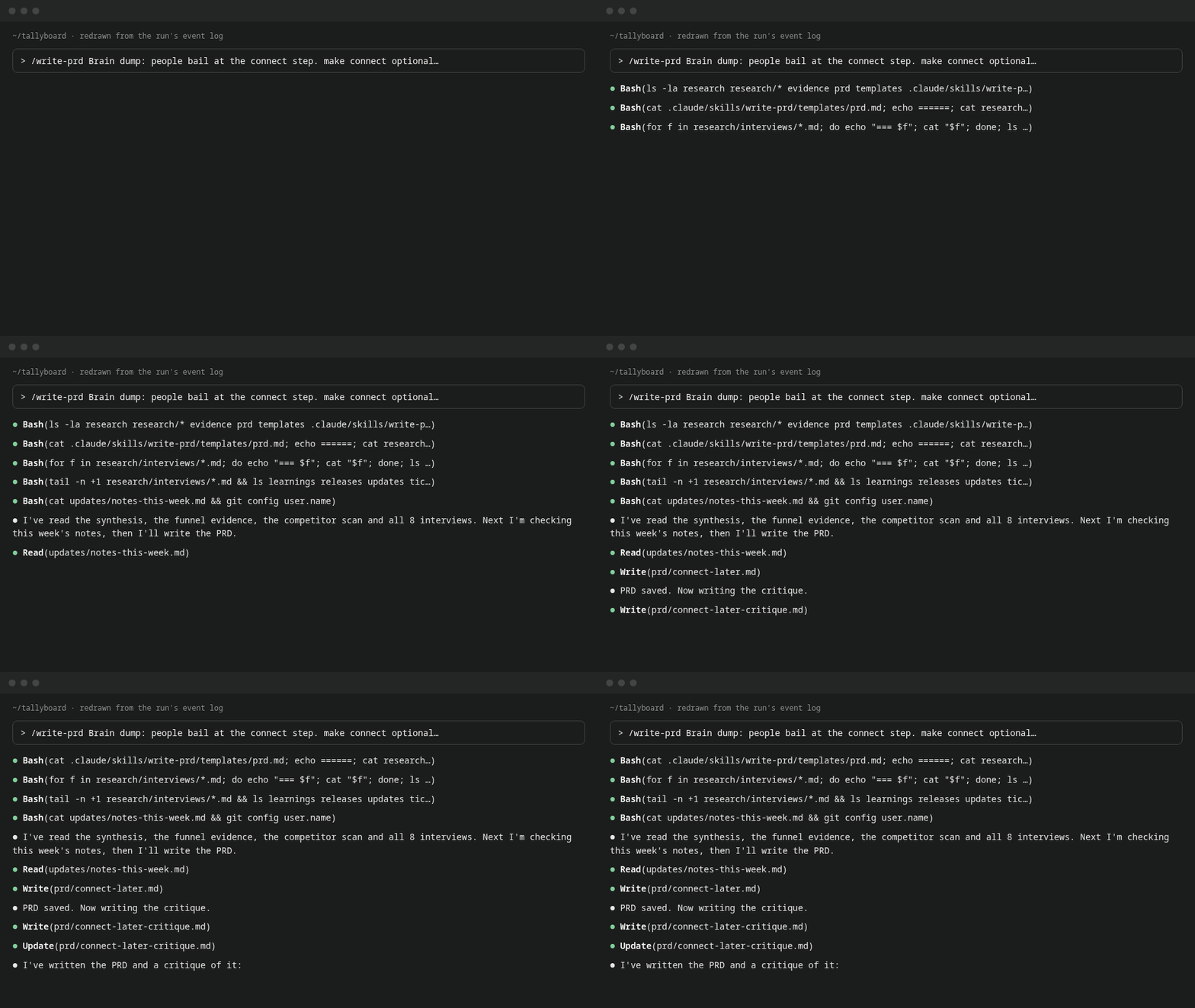
Redrawn from the run's real event log, not a screen recording. The run took 115 seconds.
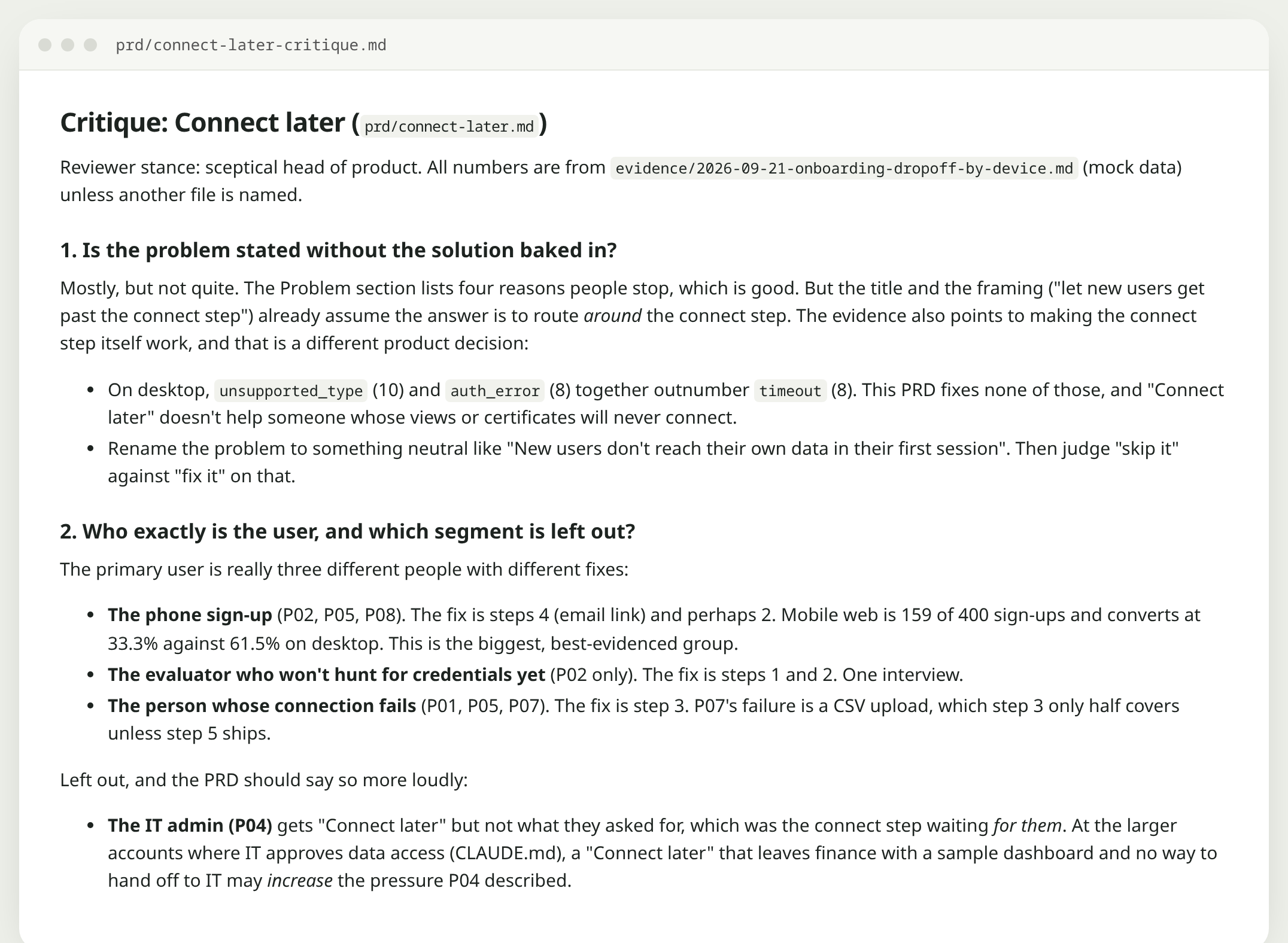
The critique questioned one of our own assumptions:
The idea that timeout errors should tell people about the IP allowlist. It rests on one interview (P01), on desktop, on Postgres. […] In the data, most timeouts are on mobile web.prd/connect-later-critique.md
It was right. Only one of the three people who hit a timeout had an allowlist problem. A banner telling everyone to check their allowlist would have sent most of them the wrong way. It also suggested testing “connect later” with a button that just counts clicks before building any sample data. That's a cheaper experiment than the one we had planned.
.claude/skills/write-prd/SKILL.md
---
name: write-prd
description: Draft a PRD from the PM's brain dump plus the evidence already in research/ and evidence/, using templates/prd.md, then critique the draft. Use when asked to write, draft or review a PRD or spec.
---

# Write a PRD

## Draft
1. Read the brain dump the PM gives you (a file or the message).
2. Read `research/synthesis.md` and the newest files in `evidence/`.
3. Fill `templates/prd.md`. Save to `prd/<short-slug>.md`.
   - Every claim about users cites a file. Every number cites a file.
   - Leave **Success metrics** and **Launch date** empty. The PM fills those in.
   - If the brain dump and the evidence disagree, keep both and flag it in Open questions.

## Critique
Then review your own draft as a sceptical head of product and save
`prd/<short-slug>-critique.md`:
- Is the problem stated without the solution baked in?
- Who exactly is the user, and which segment is left out?
- Which claim has the weakest evidence?
- What is the cheapest version that would test the idea?
- What would make us stop?
Be specific. "Consider adding more detail" is not a critique.
.claude/skills/write-prd/templates/prd.md
# <feature name>

**Owner:** <PM>  ·  **Status:** Draft  ·  **Launch date:** PM fills this in

## Problem
<the user problem, no solution in it>

## Evidence
- Qualitative: <theme, N of M, file>
- Quantitative: <number, file>
- Market: <what competitors do, file>

## Who it is for
- Primary:
- Not for (this time):

## Goals
-

## Non-goals
-

## Proposed solution
<short, testable, in steps>

## Success metrics
PM fills this in.

## Risks
-

## Open questions
-
The critique opens by questioning our framing, not our wording.
What came up
Without a review step, a generated PRD tends to agree with the notes you gave it, and can fill in success metrics that sound fine but aren't yours. Sachin Rekhi suggests using AI to critique a strategy rather than write it, which is what the second step does.
The line in the skill
“If the brain dump and the evidence disagree, keep both and flag it.” And “Leave Success metrics empty.” The numbers are your job.
Step 05Turn the PRD into tickets
The ticket skill wrote eleven tickets with Given/When/Then acceptance criteria, in build order, and put the analytics ticket first. Without it you can't tell next month whether anything worked.
It also didn't quietly settle a disagreement. The critique had said to ship less. The tickets cover the whole PRD, but the file opens by pointing out the conflict and leaves the release line to the PM.
.claude/skills/prd-to-tickets/SKILL.md
---
name: prd-to-tickets
description: Break an approved PRD in prd/ into engineering tickets with acceptance criteria, saved to tickets/. Optionally creates them in Linear or Jira through MCP after the PM approves the list. Use when asked for tickets, stories or a backlog from a PRD.
---

# PRD to tickets

1. Read the PRD the PM names. If it has no "Proposed solution" section, stop and say so.
2. Split the solution into tickets a single engineer could finish in under a week.
3. For each ticket write: title (verb first), why (one line, linked to the PRD
   section), acceptance criteria as Given / When / Then, out of scope, and open
   questions. Do not estimate: the team does that.
4. Add one ticket for analytics: the event or property we need to measure success.
5. Save to `tickets/<prd-slug>.md`, in the order they should be built.
6. Only if the PM says "create them" and a Linear or Jira MCP server is connected:
   create them as drafts in the team or project the PM names, then list the links.
Markdown
Linear or Jira MCP (optional)
What came up
We didn't have Linear or Jira connected, so it stopped at a Markdown file and said exactly what it would need to create them.
The line in the skill
“Only if the PM says ‘create them’ … create them as drafts.”
Step 06Write the release note
Engineering shipped five changes. Two were marked internal: a fake-door “Connect later” button and some new analytics events. The skill reads the change list and three past notes for tone.
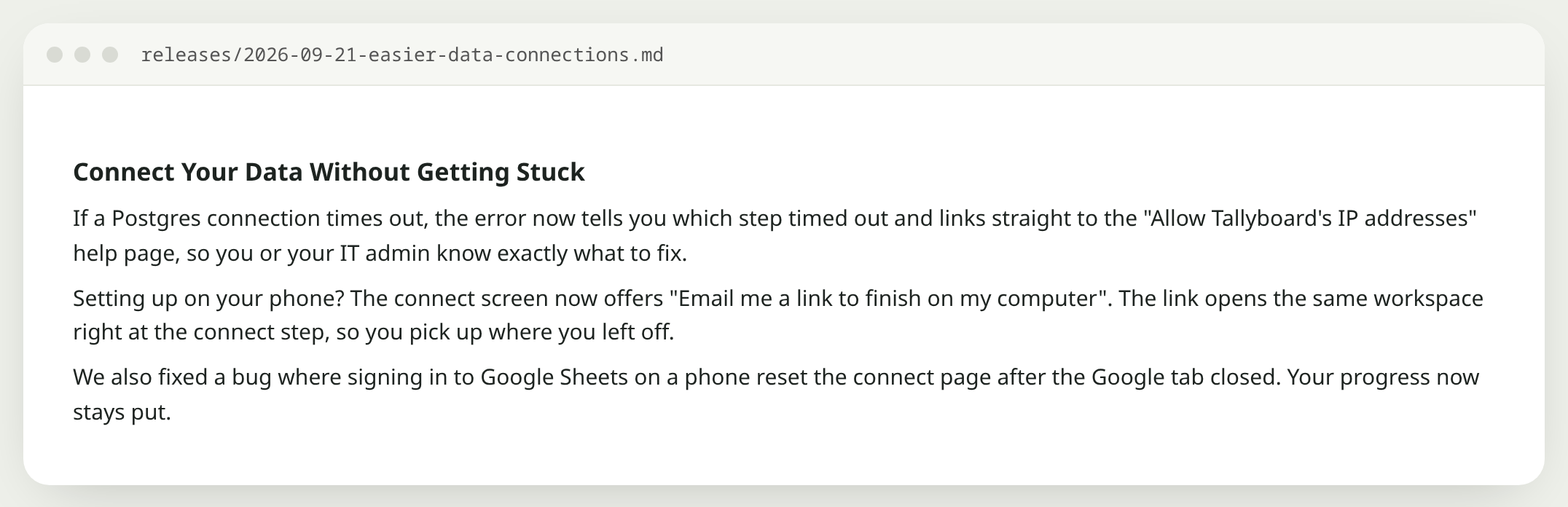
Three short paragraphs, in the same voice as the past notes.
It left out both internal changes. It also left out a line it couldn't describe (“CSV and Sheets get their own messages”, with no word on what the messages say) and asked us for the wording instead of inventing it. The allowlist tip stayed where it belongs: Postgres only.
.claude/skills/release-notes/SKILL.md
---
name: release-notes
description: Turn this release's changes (releases/changes.md, or a GitHub commit or PR URL read with the gh CLI) into a user-facing release note in the voice of releases/past-notes.md. Use when asked for release notes, a changelog entry or a "what's new" post.
---

# Release notes

1. Read what changed: `releases/changes.md`, or for a URL run
   `gh pr view <url>` or `gh api repos/<owner>/<repo>/commits/<sha>`.
2. Read `releases/past-notes.md` and match its voice and length.
3. Write for the user, not the team:
   - A title in Title Case that names the benefit.
   - One to five short paragraphs: what changed, who it helps, how to use it.
   - No ticket numbers, internal names or code words. No promises about future work.
4. Leave out anything in the changes marked internal.
5. Save to `releases/<yyyy-mm-dd>-<slug>.md`.
releases/changes.md
gh CLI for real repos
Past notes as examples
What came up
A fake-door test announced as a feature sends customers looking for something that isn't built yet.
The line in the skill
“Leave out anything in the changes marked internal.” And give it past notes to copy.
Step 07Write the weekly update
The last writing job of the week is the update for leadership. The skill reads your rough notes and the newest evidence file, and writes four headings in under 250 words.
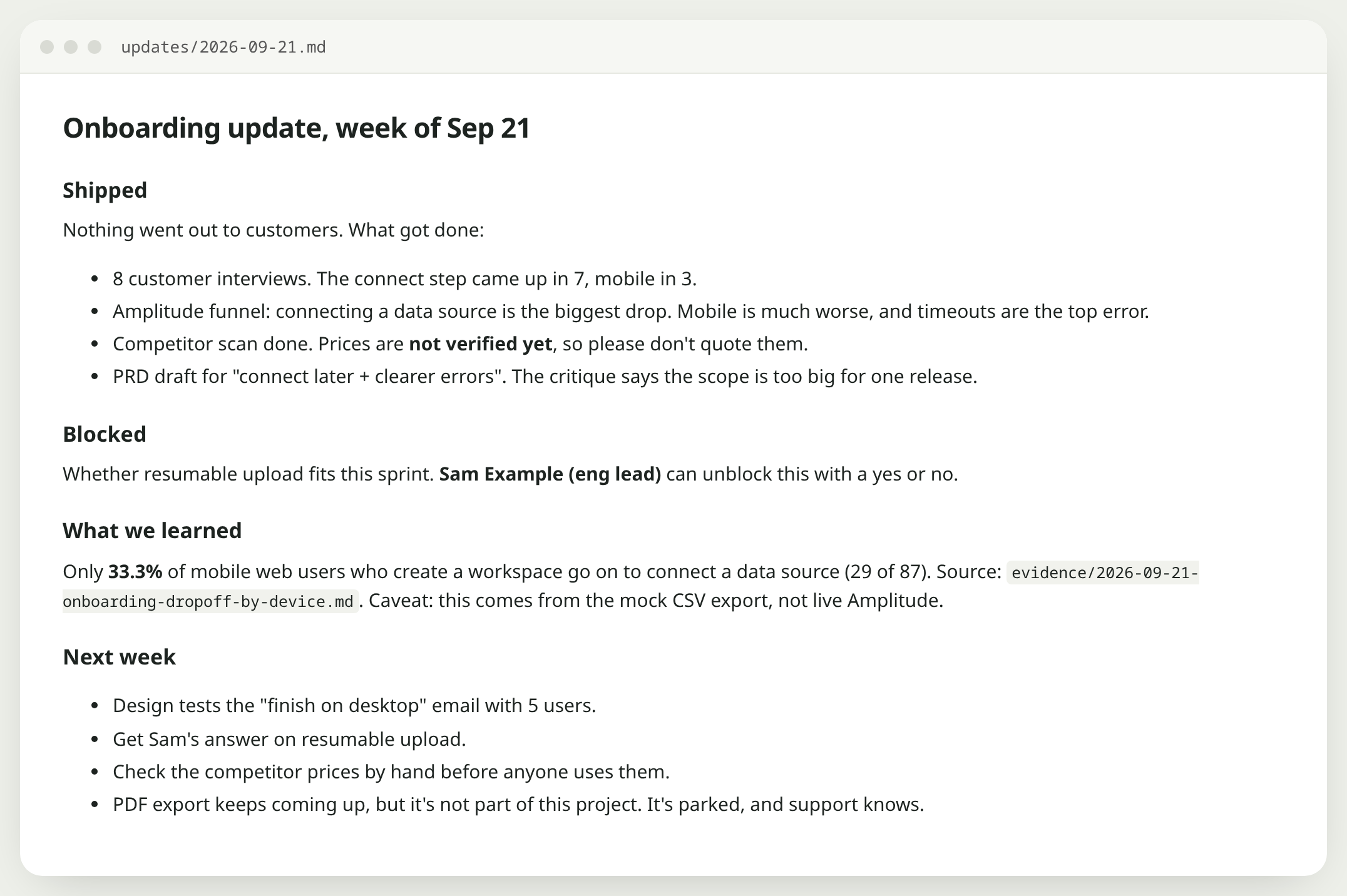
193 words. One number, with its source file. The blocker names who can clear it.
Our notes said the competitor scan was done. The update added what we'd forgotten to stress: the prices aren't verified yet, so nobody should quote them. It also kept the PDF complaints out of the project and said where they went.
.claude/skills/stakeholder-update/SKILL.md
---
name: stakeholder-update
description: Write the weekly stakeholder update from updates/notes-this-week.md and the newest evidence files. Use when asked for a weekly update, status update or leadership summary.
---

# Stakeholder update

Read `updates/notes-this-week.md` and the newest file in `evidence/`.
Write `updates/<yyyy-mm-dd>.md` with exactly four headings:

- **Shipped**
- **Blocked** (say who can unblock it)
- **What we learned** (one number, with its source file)
- **Next week**

Rules:
- Under 250 words.
- Write like a busy PM on a Friday, not a press release. No "leverage", "synergy",
  "excited to share" or "game-changer".
- If the notes do not say something, it does not go in.
What came up
Generated updates tend to sound like announcements. Mohit Aggarwal describes fixing this with a line about writing “in a hurry on a Friday afternoon”, and our skill uses a similar one.
The line in the skill
“Write like a busy PM on a Friday, not a press release.” And “if the notes do not say something, it does not go in”, so it won't pad an update with things you didn't do.
Step 08Save corrections between sessions
Claude Code starts each session with only what's in the project files. One PM on r/ProductManagement described a setup where each session saves what worked, what went wrong and what was decided, and where corrections “carry forward instead of getting lost”. We built the small version.
A hook watches what you type. Start a message with “correction:” and it appends that line to learnings/corrections.md, every time, without asking. Then a session-learnings skill writes up the session and proposes the exact line to add to CLAUDE.md. It proposes; you approve.
When we ran session-learnings after that correction, it also checked the rest of the project and found two files that still broke the rule: the PRD and one ticket both suggested the allowlist for “Postgres and warehouse”. It proposed five exact edits, to CLAUDE.md, two skills, the PRD and the ticket, and asked which ones to apply.
hooks/log-correction.py
"""UserPromptSubmit hook: when a prompt starts with a correction, save it.

Appends to learnings/corrections.md so the next session (and /session-learnings)
sees it. Always exits 0, so it never blocks your prompt.
"""
import datetime
import json
import os
import re
import sys

TRIGGER = re.compile(r"^\s*(correction:|no[,.]|that's wrong|thats wrong|wrong:|remember:)", re.I)

try:
    prompt = json.load(sys.stdin).get("prompt", "")
except Exception:
    sys.exit(0)

if TRIGGER.match(prompt):
    root = os.environ.get("CLAUDE_PROJECT_DIR", os.getcwd())
    path = os.path.join(root, "learnings", "corrections.md")
    os.makedirs(os.path.dirname(path), exist_ok=True)
    stamp = datetime.datetime.now().strftime("%Y-%m-%d %H:%M")
    with open(path, "a", encoding="utf-8") as f:
        f.write(f"- {stamp}: {prompt.strip()}\n")
sys.exit(0)
---
name: session-learnings
description: At the end of a working session, save what worked, what went wrong, decisions and corrections to learnings/, and propose (not make) changes to CLAUDE.md or skills. Use when the user says "wrap up", "save learnings" or ends a session.
---

# Session learnings

1. Look back over this session.
2. Write `learnings/<yyyy-mm-dd>.md` with:
   - **What worked**: steps or prompts worth repeating.
   - **What went wrong**: mistakes, including yours, and how they were caught.
   - **Decisions**: what was decided and why, in one line each.
   - **Corrections**: anything the user corrected. Also copy in any lines from
     `learnings/corrections.md` added today.
3. Propose edits: for each lesson that should change future behaviour, show the exact
   line you would add to CLAUDE.md or to a skill. Do not apply them until the user says yes.
What came up
Asking Claude to update CLAUDE.md after each mistake only works if you remember to ask.
The line in the skill
A hook runs whether you remember or not. We sent “correction: timeouts are not always an IP allowlist problem” and the line was in the file before Claude replied.
Checking the output
Because we planted the problem, we knew the right answers before we ran anything. That makes this whole project an eval. Before we ran the skills we wrote the expected findings down, then scored each run against six yes-or-no questions.
evals/rubric.md
# Rubric (score each 0 or 1)

1. Every quote is found word for word in the file it cites.
2. Every number names its source.
3. The biggest expected finding is first.
4. Single observations are not listed as themes.
5. The disagreement is shown with both sides, not resolved.
6. Nothing appears that is not in the sources.

6 of 6 to ship a skill change. 5 of 6: fix before sharing. Below 5: roll back.
The synthesis scored 6 of 6, but it didn't match our key exactly. We expected “wants a template or sample data” in 3 of 8 interviews. Claude split the founder's “let me skip the connect step” into its own theme, so templates came out at 2 of 8. Reading it again, its split is arguably better than ours. An answer key is a judgement too. When the run and the key disagree, read both before you “fix” the skill.
evals/check_quotes.py
"""Check every quote in a markdown file against the interview it cites.

Usage: python3 evals/check_quotes.py research/synthesis.md
A quote looks like: "some words" (file-name.md)
"""
import os
import re
import sys

ROOT = os.path.dirname(os.path.dirname(os.path.abspath(__file__)))
DIR = os.path.join(ROOT, "research", "interviews")
QUOTE = re.compile(r'["\u201c]([^"\u201d]{12,}?)["\u201d]\s*\(([^()]+?\.md)\)')


def norm(s):
    s = s.replace("\u2019", "'").replace("\u2018", "'").replace("\u201c", '"').replace("\u201d", '"')
    s = s.replace("\u2026", "...")
    return re.sub(r"\s+", " ", s).strip().lower()


text = open(sys.argv[1], encoding="utf-8").read()
found = QUOTE.findall(text)
missing = []
for quote, name in found:
    path = os.path.join(DIR, os.path.basename(name.strip()))
    body = norm(open(path, encoding="utf-8").read()) if os.path.exists(path) else ""
    parts = [p for p in re.split(r"\.\.\.|\u2026|\[\.\.\.\]", quote) if p.strip()]
    if not body or not all(norm(p) in body for p in parts):
        missing.append((name, quote))

print(f"{len(found)} quotes checked, {len(missing)} missing")
for name, quote in missing:
    print(f"  MISSING in {name}: {quote[:80]}")
sys.exit(1 if missing else 0)
Run the evals every time you edit a skill, so you know whether the new version is better instead of guessing.
Using it in a team
Anthropic has written up how its own teams use Claude Code. The pattern isn't PMs writing prompts. It's non-engineers building small tools for their own jobs: a growth marketer building a Figma plugin to make ad variations, the legal team prototyping an internal tool, data teams learning a codebase through its CLAUDE.md. Read their write-up.
The same shape shows up in the PM posts we read. Skills live in a shared repo so the team gets the same workflow. Data comes through MCP servers such as Amplitude, PostHog, Metabase or a warehouse, not screenshots. Nothing leaves the building without a human checking it. When a skill works for you, put it in the team's repo. The next step is Claude in Slack, which Claude Code sets up with /install-slack-app, so teammates can ask for the same workflow where they already talk. We haven't run these skills through it yet.
Sources
We read these before building the kit. Several of the skill rules above build on ideas from them.
No. You type in plain English. The skill files are Markdown. Claude writes the small scripts (the funnel maths, the quote checker) and runs them for you. You do need to be comfortable opening a terminal in a folder.
Is any of this real data?
The product, the people and the numbers are made up. The tools are real: a real Amplitude project, the official Amplitude MCP server, real competitor pricing pages, and fresh Claude Code sessions. We planted the problem on purpose so you can check whether each workflow finds it.
Why do the evals live in the kit if Claude must not read them?
Because you need them to check a run. CLAUDE.md tells Claude not to open evals/ unless you ask for an eval, and when we tested we removed the folder entirely. If you want to be strict, keep your answer key outside the project folder.
What about Jira, Linear, Notion or BigQuery?
Each has an MCP server you add the same way as Amplitude. The ticket skill already says to create tickets only after you approve the list. We didn't connect Linear or Jira for this post, so that step stops at a Markdown file. We say so where it happens.
Where to start
You don't need all eight. Pick the job you repeat most often, copy the skill closest to it, and change the template until the output looks like yours. Then write down two inputs where you already know the right answer. That's your first eval. Next week, pick another one.
Run it yourself on the same fictional product.
The kit has the fake product, the eight skills, the hook and the answer key. Unzip it, copy the skills, type /synthesize-interviews.