

2 October 2026 · 7 min read
Ollaya puts the decision model on your machine. Check the checkpoint before you trust it.
Ollaya answers typed questions in about 10 ms on a local GPU, and its API copies the hosted one. The speed is real, but the default checkpoint is near chance on some tasks, and that's where most people will start.
By Dr. Aki Wijesundara, TAI Labs
Most teams still route a support ticket the same way. They send the text to a chat model, ask for one word back, and parse whatever comes out. It works, but you're paying for a generation loop to produce a single label. Ollaya, an open-source runtime that its own site marks as Beta, starts from the opposite assumption. It serves decision models, which read a text plus a list of typed questions and return probabilities, and it does that on your own hardware.
A decision doesn't need the model to write anything
The site puts it plainly: a decision model answers in a single forward pass, with no token-by-token generation. You send a state (a message, an email, a JSON object) and typed questions that are choice, score or yes/no. You get a probability for every option. In the documented example the usage block reads 43 input tokens and 0 output tokens.

The home page shows the idea with a guard for an agent's shell commands. The request is "Fix the typo in README.md" and the command is git push --force origin main. One call answers four questions at once, and the answers come with probabilities. Look at the first one. The model says block, but with only 0.53 behind it, while destructive comes back yes at 0.90. That's the useful part of a calibrated answer: you can set a different threshold for each question instead of trusting a bare yes or no.

The speed gain is real, but the comparison is loose
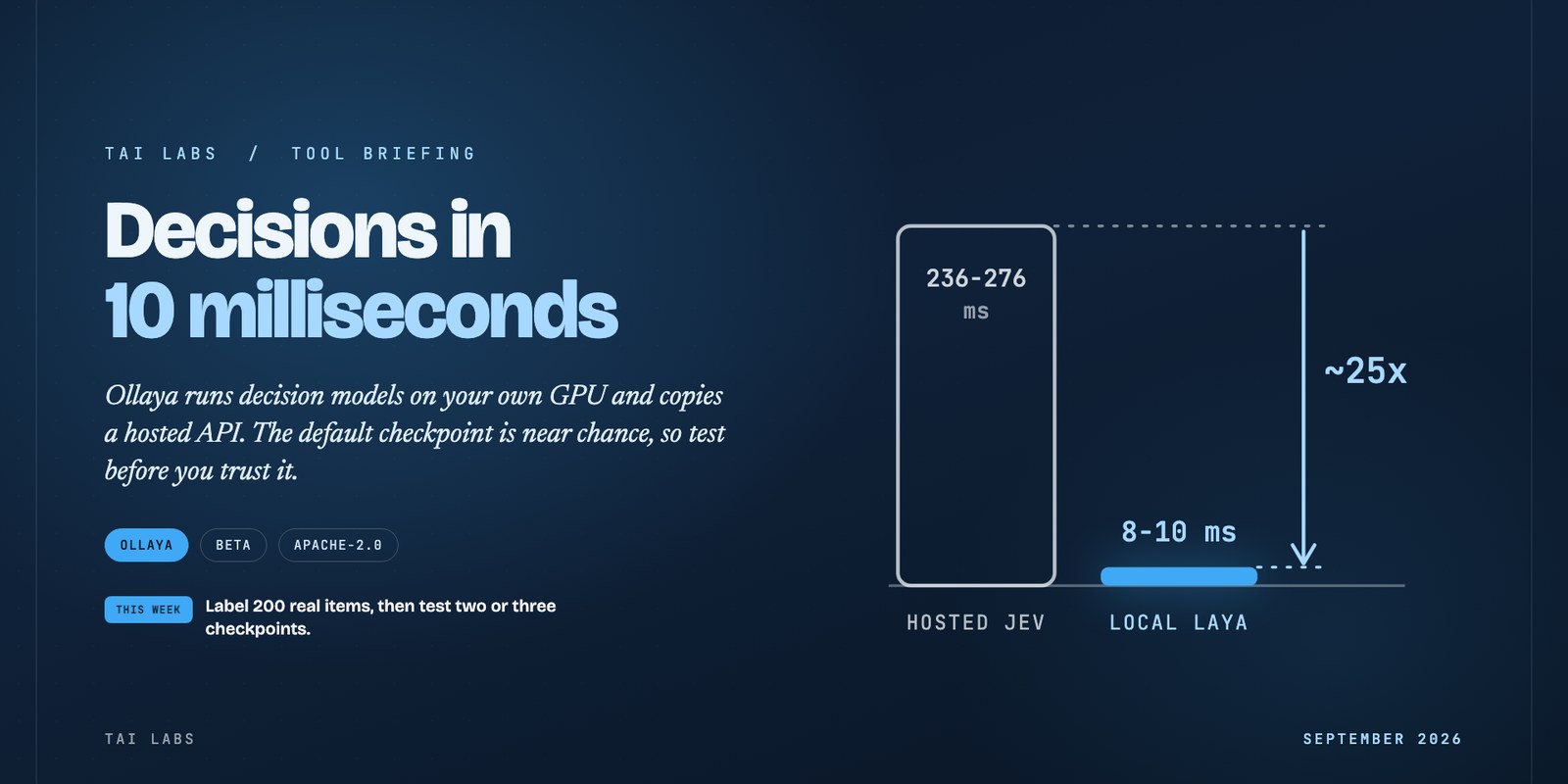
On an RTX 4090, Ollaya reports a median of 8.1 ms for laya:multilingual and 9.6 ms for laya:en on a five-question request through the HTTP API. The hosted Jev API sits at 236 to 276 ms in third-party benchmarks. That's roughly a 25-fold gap, which is my arithmetic from the two ranges, not a number the site prints.
Three things shrink it. The hosted figure includes the network round trip and the local one doesn't. Ollaya itself says the setups differ and asks you to read the chart as an order of magnitude. And the speed belongs to the small models. Decider, the larger decoder family, takes 155 to 190 ms, which is already inside the hosted range. Hardware matters too. The Laya model card quotes 39.5 ms for a single question on a T4, and the Laya page cites 16.3 ms for laya:en on the 4090 from an earlier benchmark. So 8 to 16 ms is the honest range for the fast path, and every published figure comes from an NVIDIA GPU.

Trying it costs three environment variables
Ollaya serves /v1/systemone and /v1/models with TypeSafe's request and response shapes. The official Python SDK, version 0.7.1, works unchanged. You point the base URL at http://localhost:11435, use any API key, and set the default model to laya. That last step matters, because otherwise the SDK asks for its own default, jev-latest, and gets a MODEL_NOT_FOUND error back.
The guide is careful to say that compatibility covers the API, not the model. It also says Ollaya is independent and not affiliated with TypeSafe. So the cost of switching is mostly gone, which leaves the harder question of whether the answers are as good.
The default checkpoint is near chance, and only the tuned one beats Jev
Ollaya's models page ranks each model's default tag on typed-decisions accuracy. The spread is wide: decider:2b scores 0.591, nli 0.548, gliclass 0.477. Laya, the fastest, scores about 0.36. The docs explain why. The base Laya checkpoints are near chance zero-shot on that task, and the tag to use is laya:typed-decisions, which is fine-tuned for it. That one scores 0.766 against 0.727 published for Jev 1.13.

Then comes the other side. On Banking77, a choice question with many options, Laya scores 0.425 against 0.870 for Jev, and Ollaya warns that questions with more than about 20 options are weaker. So one model beats the hosted one on one benchmark and loses by nearly half on another. Calibration has a catch as well. The Laya card reports a calibration error of 0.081 after temperature fitting, against 0.246 for Jev, but the raw checkpoints are over-confident until you refit them, and laya:multilingual ships without refit temperatures.
Treat every number here with care. The site says the typed-decisions labels have low annotator agreement, so the scores are for comparing models with each other. Jev's figures are published numbers, and the docs don't say they come from one shared test harness.

Local also means private, and no per-token bill
Tickets, emails and user messages are often the most sensitive data a company has, and here they're scored where they already live. Ollaya runs on ONNX Runtime, on the CPU or an NVIDIA GPU, and the server listens on 127.0.0.1 by default. Weights come from their authors' Hugging Face repositories, pinned to a commit and checked against sha256, and Ollaya never re-hosts them. There are no per-token fees, so the cost becomes your hardware. On a Mac, only laya and nli use the Apple GPU, through MLX, and the rest run on the CPU. Check each model's licence on its library page. The runtime and Laya are Apache-2.0.
Put it in front of the model you already pay for
The safest way to try this is as a gate. Let the local model settle the cases it's sure about, and send the rest to whatever you use today. The function below does that for a support inbox. It calls the local endpoint, acts when the confidence clears a floor, and otherwise asks a Claude model.
import json
import urllib.request
import anthropic
llm = anthropic.Anthropic()
URL = "http://localhost:11435/v1/systemone"
HEADERS = {"Authorization": "Bearer local",
"Content-Type": "application/json"}
INTENT = {"type": "choice",
"instructions": "What does the customer want?",
"criteria": {"invoice": "Needs an invoice or receipt",
"refund": "Wants money back",
"other": "Anything else"}}
def decide(text):
body = {"model": "laya", "state": text,
"questions": {"intent": INTENT}}
req = urllib.request.Request(
URL, json.dumps(body).encode(), HEADERS)
with urllib.request.urlopen(req) as r:
return json.load(r)["answers"]["intent"]
def route(text, floor=0.80):
a = decide(text)
if a["confidence"] >= floor:
return a["choice"], "local"
resp = llm.messages.create(
model="claude-sonnet-5", max_tokens=20,
messages=[{"role": "user", "content":
"Reply with one word: invoice, refund "
f"or other.\n\n{text}"}])
word = resp.content[0].text.strip(" .\n").lower()
return word, "llm"The 0.80 floor is a placeholder. Ollaya defines confidence as the normalised top probability, so it isn't the same as accuracy, and raw checkpoints are over-confident until refit. Pick the floor from your own data.

This week, label about 200 real items from your own queue. Run two or three Ollaya tags against them, including laya:en and laya:typed-decisions, and record two numbers for each: accuracy against your labels, and the share of items that clear your floor. If a tag beats your current step at a floor you can live with, route that share locally. If it doesn't, you've spent an afternoon and learned it before production did.
Every figure here comes from ollaya.dev, including the home page, the models page, the Laya page and the TypeSafe compatibility guide, read on September 26, 2026. They are Ollaya's own measurements or its quotes of third-party benchmarks, not independent tests. The screenshot in Fig. 1 is from the home page.